The gap between "service completed" and "invoice sent" is the most expensive gap in a pest control P&L, and closing it is the entire reason this category of software exists.
Count the recurring accounts on your book that got billed late last month, or never got an invoice at all. Most owners cannot answer that from memory, and that is the problem worth solving before you shop for anything.
What's in this guide
- Why this is about more than sending an invoice
- The five billing features that actually matter
- The best pest control billing software in 2026
- Pest-native or generalist: which side you belong on
- What it costs
- If you only need to send invoices
- How to switch without losing your billing history
Why this is about more than sending an invoice
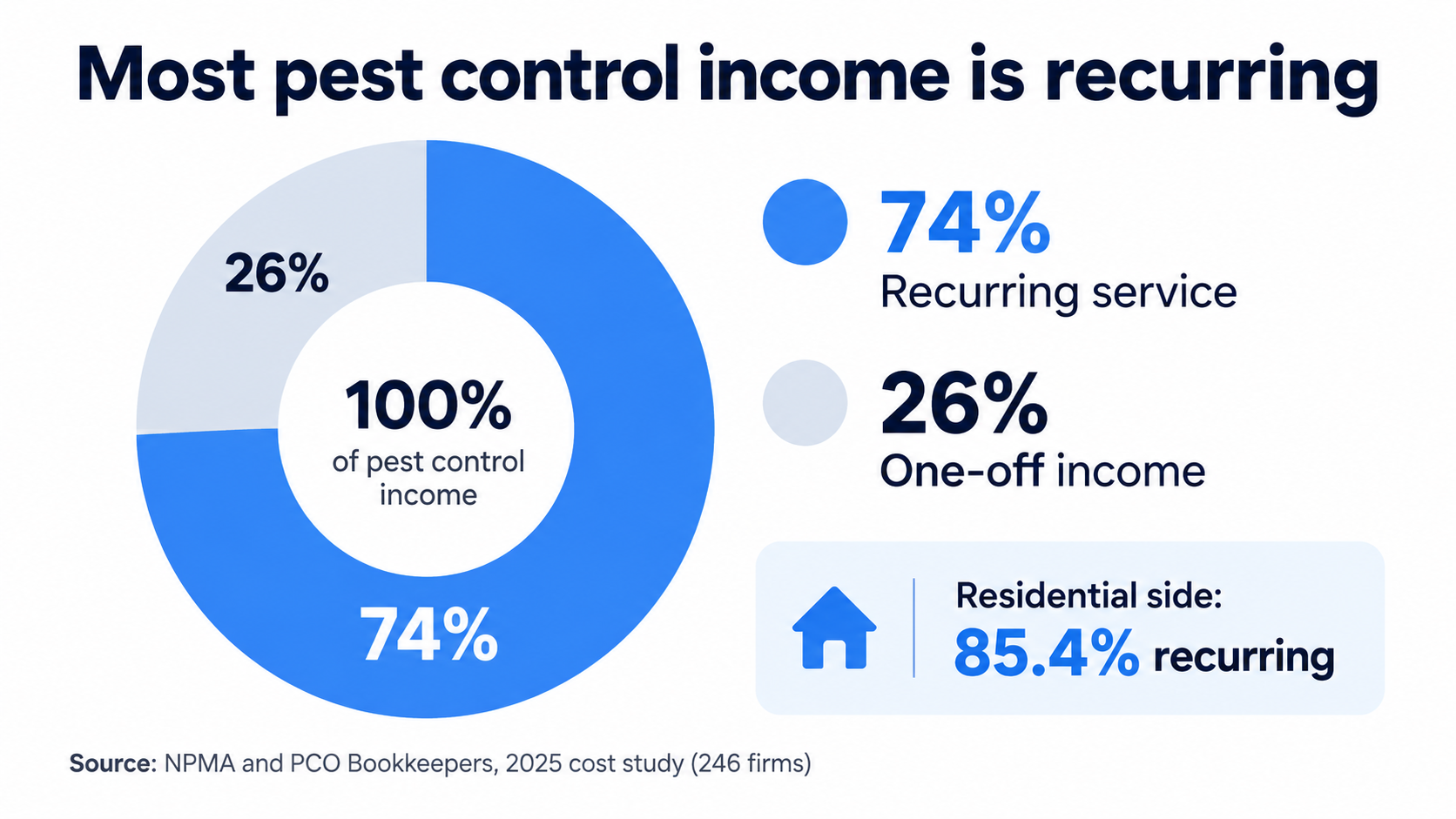
Here is the number that reframes it. In a typical pest control company, 74% of income is recurring, according to the 2025 cost study from the National Pest Management Association and PCO Bookkeepers, which aggregated data from 246 firms with $584 million in combined revenue. On the residential side specifically, NPMA's 2025 industry survey puts the recurring share at 85.4%. Most of your revenue is meant to land on a schedule, automatically.
That changes what billing software is for. In a one-off trade, an invoice is a transaction. In pest control, the invoice is how a recurring relationship turns into cash, over and over, for years. A technician finishes a perimeter service, means to send the invoice that evening, gets pulled into the next stop, and three days later nobody is sure whether that account was billed. Multiply that across a route of fifteen stops a day and the un-triggered invoices add up to real monthly revenue that never shows up.
"The pest control industry has experienced dramatic changes since our last cost study in 2019, including the COVID-19 pandemic, significant labor market shifts, and evolving customer expectations," said Dan Gordon, founder of PCO Bookkeepers & M&A Specialists. The shift in customer expectations is the operative part for billing: homeowners now expect a card on file and a predictable charge on a predictable date, the same way they pay for a streaming service, and the companies set up to bill that way collect faster than the ones still invoicing by hand at the end of the week.
There is a second wrinkle specific to this trade. Commercial accounts, and termite work in particular, often expect the invoice to reflect exactly what was applied and where. The label is the law, and a WDO inspection on the NPMA-33 form carries documentation requirements that outlive the bill. That single requirement is what pushes some companies toward pest-native software and lets others stay on a generalist tool, and it is worth settling before you compare prices.
The five billing features that actually matter
Before looking at any product, decide which of these you need. A tool can be excellent and still be wrong for you if it is strong on features you will never use and thin on the one you will.
| Feature | What to look for | Why it matters in pest control |
|---|---|---|
| Recurring invoice automation | Invoices generate and send automatically when a scheduled job is marked complete, on monthly, quarterly, or annual cycles | This is the leak. Every manual trigger between service and invoice is a chance for the bill to never go out |
| Autopay / card on file | Saved card charged automatically per the service schedule, through Stripe, Square, or a built-in processor | Turns recurring accounts into money that arrives without a phone call. Directly shrinks days-to-payment |
| Mobile invoicing | Technician can send or close out an invoice from the truck, not just office staff from a desk | In pest control the person who completes the job is usually the one who should trigger the bill |
| Chemical and WDO data on the invoice | Material and application details, and termite inspection data, flow onto the invoice or attach to it | Required by many commercial accounts and useful in any billing dispute. The main reason to go pest-native |
| QuickBooks sync | Two-way sync so invoices and payments reconcile against your books without re-entry | If a bookkeeper already lives in QuickBooks, this decides how much manual reconciliation you keep doing |
Pro tip: Before you demo anything, write down the single billing task that eats the most office time this week, name it in one sentence, and make the salesperson show you that exact task in the product. A generic demo hides the thing you actually need.
Payment-reminder automation sits just behind these five. Automated sequences that chase an unpaid invoice before it ages to 60 days are useful, but they treat a symptom. Autopay prevents the overdue invoice in the first place, so prioritize getting accounts onto a card on file over getting better at chasing them.
The best pest control billing software in 2026
Six platforms, each built for a different kind of pest control company. The right one depends on your size, whether your accounts are residential or commercial, and whether you need chemical documentation on the bill. Prices are from each vendor's own pricing page and change often, so confirm current rates before you commit.
| Platform | Starting price | Billing model | Pest-native | Best fit |
|---|---|---|---|---|
| GorillaDesk | $49/mo per route | Per route (technician schedule) | Yes | Solo to small pest crews wanting pest-native recurring billing at a published price |
| Jobber | $49/mo (1 user) | Per plan, per user above the included seats | No | Companies that want the cleanest invoicing experience and do not need chemical-to-invoice |
| Housecall Pro | $59/mo (1 user, annual) | Per plan, 1 to 8 users by tier | No | Residential companies wanting recurring service plans, consumer financing, and low card rates |
| PestPac (WorkWave) | Not published (quote) | Quote-based | Yes | Larger multi-market and commercial operations needing documentation tied to the bill |
| FieldRoutes | Not published (quote) | By active customer volume | Yes | Companies billing thousands of recurring residential accounts |
| Briostack | Not published (quote) | Quote-based | Yes | Pest and lawn companies selling prepaid seasonal plans rather than billing per visit |
GorillaDesk
GorillaDesk is pest-native billing with its prices on the table, which is rare in this group. Subscription billing through Stripe and Square, chemical and material tracking, and device and trap barcoding are built in, and the company was founded by former pest and lawn care operators.
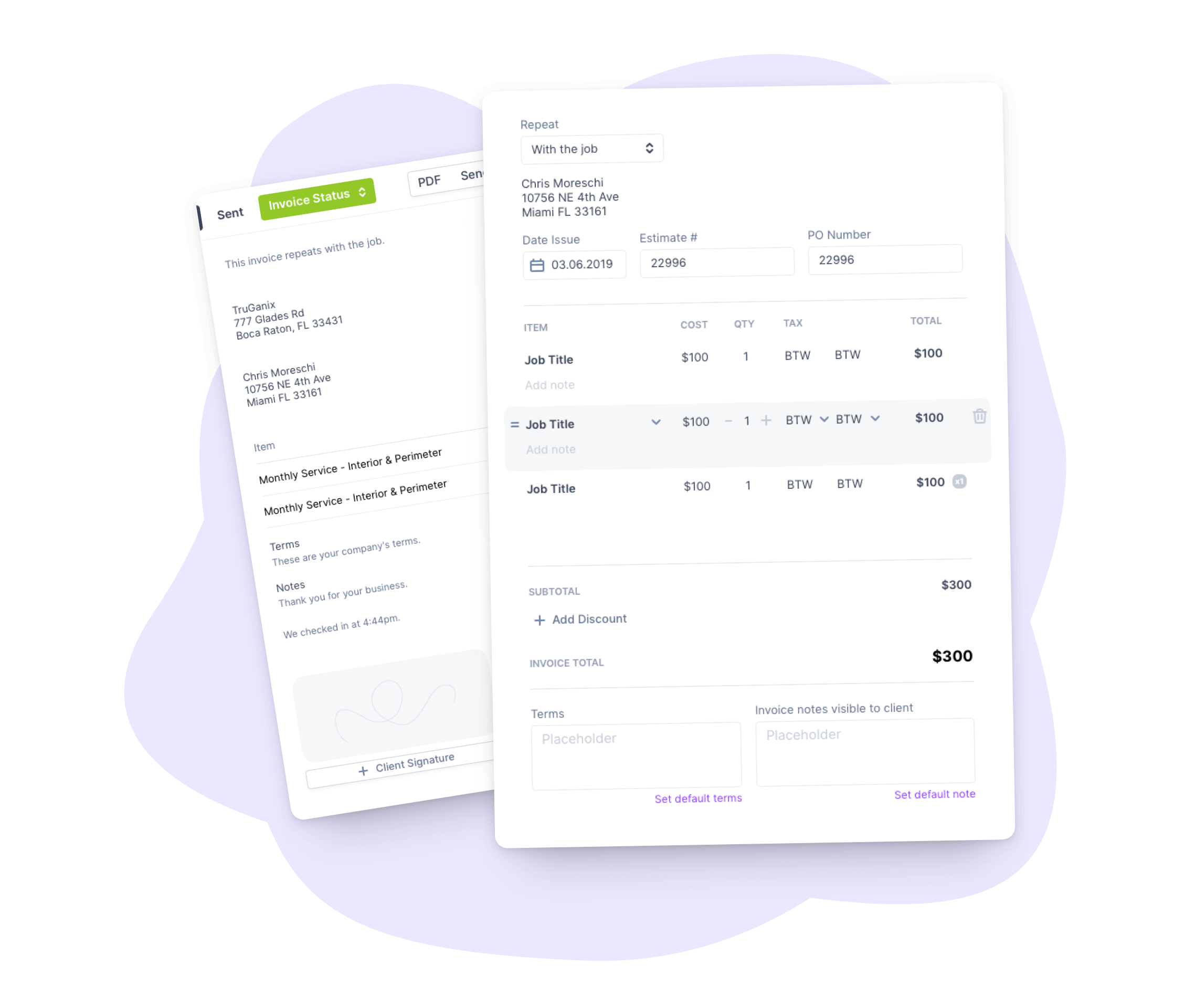
Pricing is per route, meaning per technician schedule rather than per user, and admin users and mobile devices are unlimited on every plan. Basic runs $49 per month per route and covers invoices, estimates, Stripe and Square payment acceptance, material tracking, and automated late-payment email and SMS. Recurring subscription billing, the customer portal, e-signatures, device barcoding, and two-way QuickBooks Online sync arrive on Pro at $99 per month per route, which is where most growing companies land once recurring volume picks up. Growth at $149 per month per route adds a sales suite and multi-branch support. There are no contracts or setup fees, data migration is free, and the trial runs 14 days.
Best for: Solo operators through small multi-route crews that want recurring pest billing without a generalist's broader feature set. Because pricing is per route, a five-truck company multiplies the per-route rate, so the math is cleanest for smaller crews. SMS messaging is a paid add-on on every plan, which is worth factoring in if you lean on text reminders.
Jobber
Jobber is the most polished invoicing experience in the group, and the fastest for a new user to pick up. Batch invoicing, customizable templates, automated reminders, and Client Hub, where a customer approves a quote and pays an invoice in one place, are all strong and well reviewed.

Core starts at $49 per month for one user ($29 per month billed annually) and covers invoicing and online payments. Automatic payments for recurring work, QuickBooks Online sync, and automated invoice follow-ups arrive on Connect at $139 per month ($99 annually). Grow is $199 per month ($149 annually) and Plus is $499 per month for five users ($399 annually). Additional users are $29 per month each. Card processing is 2.9% plus 30 cents, and bank payments (ACH) are 1%. The trial is 14 days.
Best for: Pest control companies that prioritize a clean, well-reviewed billing workflow over pest-specific documentation. Jobber does not log chemical applications, EPA registration numbers, or treatment-area data on the invoice, so a termite or commercial-heavy operation usually keeps a separate compliance record or chooses a pest-native tool instead. For a residential book that does not need that, the experience is hard to beat.
Housecall Pro
Housecall Pro's billing strengths are recurring service plans, consumer financing, and the lowest card-processing rate in this group. QuickBooks Online sync keeps the books reconciled for companies whose bookkeeper already works in QuickBooks.
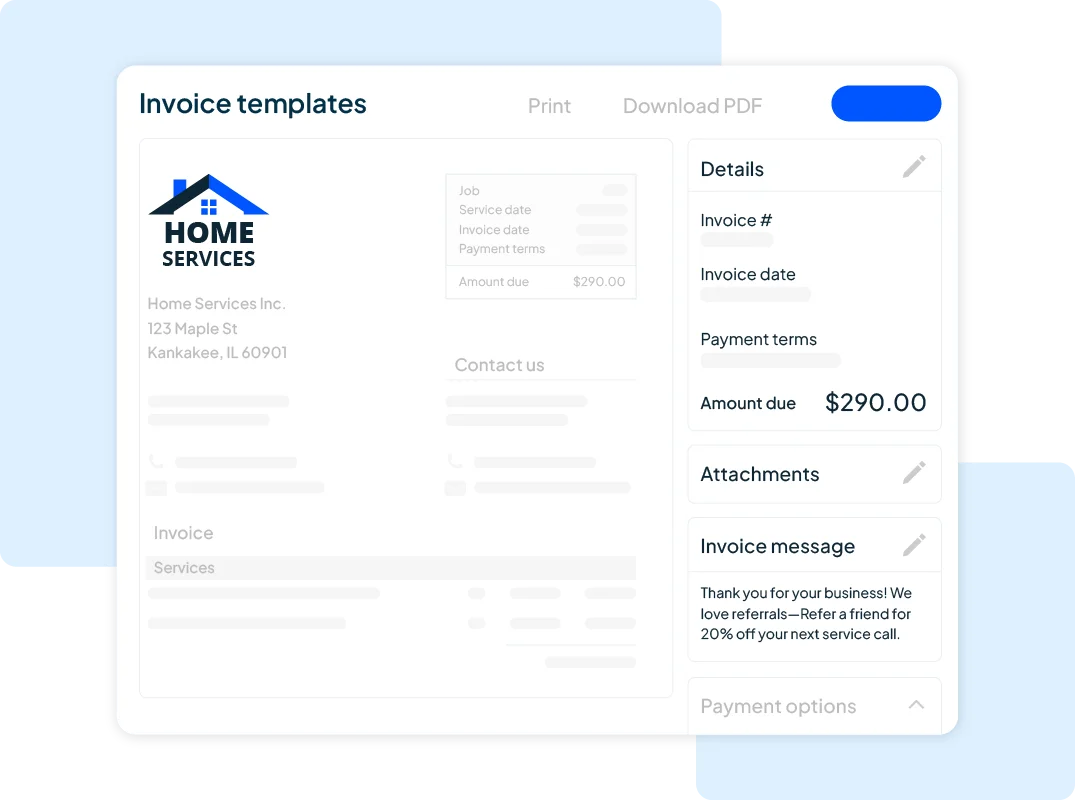
Basic is $59 per month billed annually ($79 monthly) for one user and covers invoices, payments, and estimates. Essentials at $149 per month annually ($189 monthly) includes five users and adds QuickBooks Online sync, routes, and flat-rate pricing. Max at $299 per month annually ($329 monthly) includes eight users, adds Recurring Service Plans and route optimization, and charges $35 per month for each additional user. Card processing starts as low as 2.59%, bank payments are 1%, consumer financing is available on every plan, and the trial is 14 days.
Best for: Residential pest control companies that want recurring maintenance agreements and the option to offer financing on larger jobs, with QuickBooks Online handling the books. Core recurring-billing depth sits on Essentials and above, so a true solo operator on Basic gets invoicing without the recurring-plan automation, which is worth knowing before you sign up at the entry tier.
PestPac (WorkWave)
PestPac is the pest-industry incumbent, and its billing strength is documentation. Chemical usage, WDO and termite inspection data, and IPM workflow details flow directly onto the invoice, so a commercial account can see exactly what was applied and where, which matters for regulatory recordkeeping. One-off, monthly, quarterly, and annual cycles run from the same work-order screen, and a digital logbook keeps inspection reports and signed documents alongside each account's billing history.
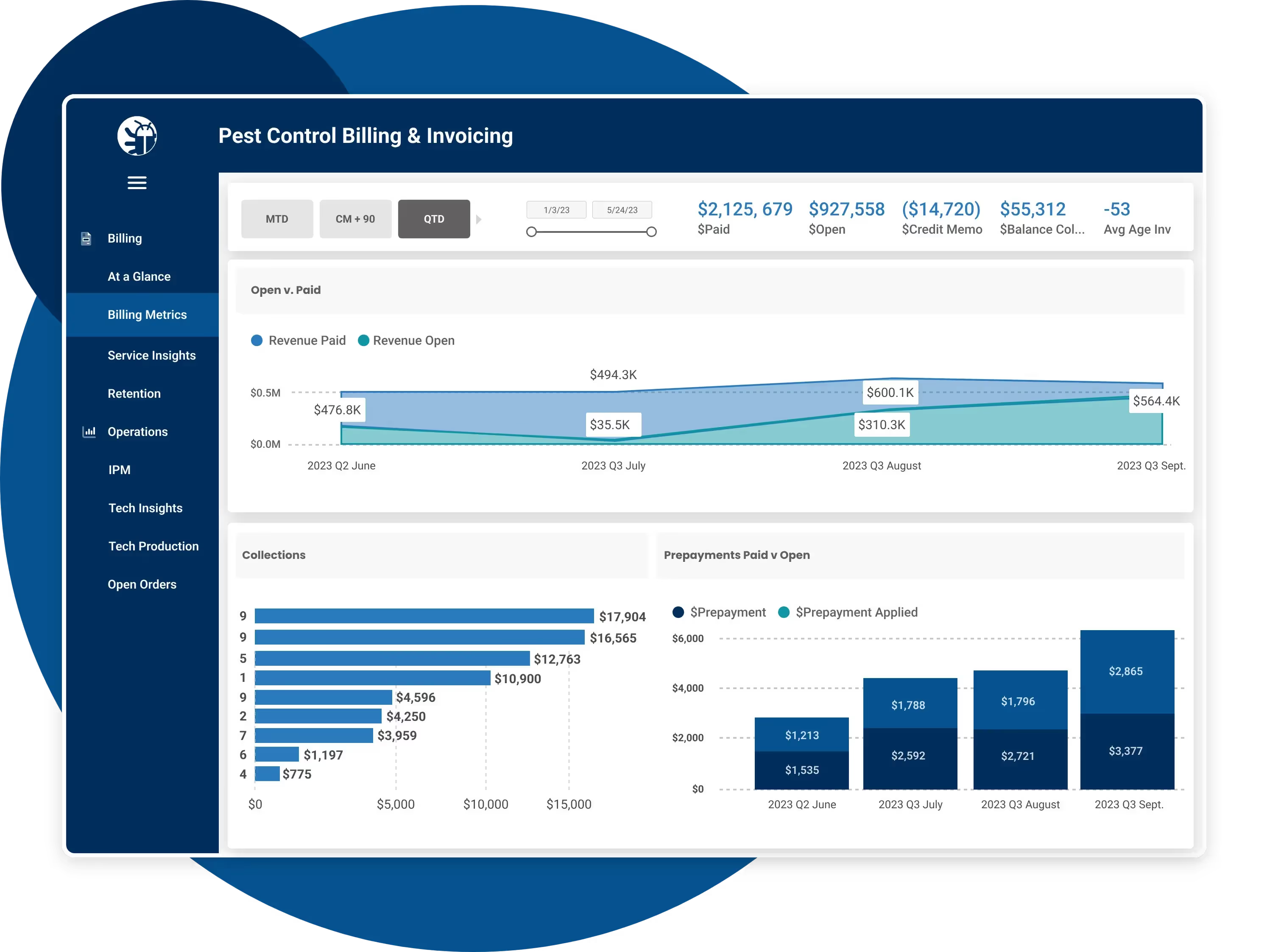
Pricing is quote-based and not published, so a demo is the only way to get a real number, and reviewers consistently describe a multi-week ramp before office staff run billing confidently.
Best for: Larger multi-market and commercial-heavy operations where chemical-and-WDO documentation tied to the invoice is a hard requirement. The depth that serves those companies is more than a crew under ten technicians needs, so smaller residential operators usually find a lighter tool fits better. If compliance documentation on the bill is non-negotiable, this is the category's reference point.
FieldRoutes
FieldRoutes, a ServiceTitan company, prices by customer volume rather than by seat, which is unusual and tells you who it is built for. A company with a large recurring residential book pays based on how many active accounts it bills, not how many office staff log in, and billing is built around subscription-style residential contracts with automated renewals and a customer payment portal. Territory-level reporting rolls billing performance up across branches, which helps a multi-branch back office see collections and aging in one view.

Pricing is quote-based and not published, and there is no free trial, so a demo is the route to real numbers.
Best for: Mid-to-large companies billing thousands of recurring residential accounts, where per-customer volume is the right way to think about cost. Below that volume the per-seat-free model has less to offer, so a smaller crew usually pays for more billing capacity than it needs. For a large, fast-growing residential book, the volume model is the point.
Briostack
Briostack is built for pest and lawn care, and its distinctive billing angle is prepayment. Instead of billing visit by visit, it supports prepayment campaigns that bill a customer up front for a season of service, a genuinely different cash-flow model from the autopay-per-visit approach everything else here uses. Recurring service-plan setup, grouped treatment rounds so no appointment and therefore no invoice trigger gets missed, and a customer billing portal round out the fundamentals.

Pricing above the entry tier is not published publicly and moves to a custom quote, so confirm current numbers directly.
Best for: Pest and lawn companies that want to sell prepaid seasonal plans rather than bill per visit. If seasonal prepay fits your customer base, the prepayment tooling is the reason to look here. For straight per-visit recurring billing, the other pest-native options cover more ground.
Pest-native or generalist: which side you belong on
The decision is simpler than the six-way comparison makes it look, and it turns on documentation, not features in general.
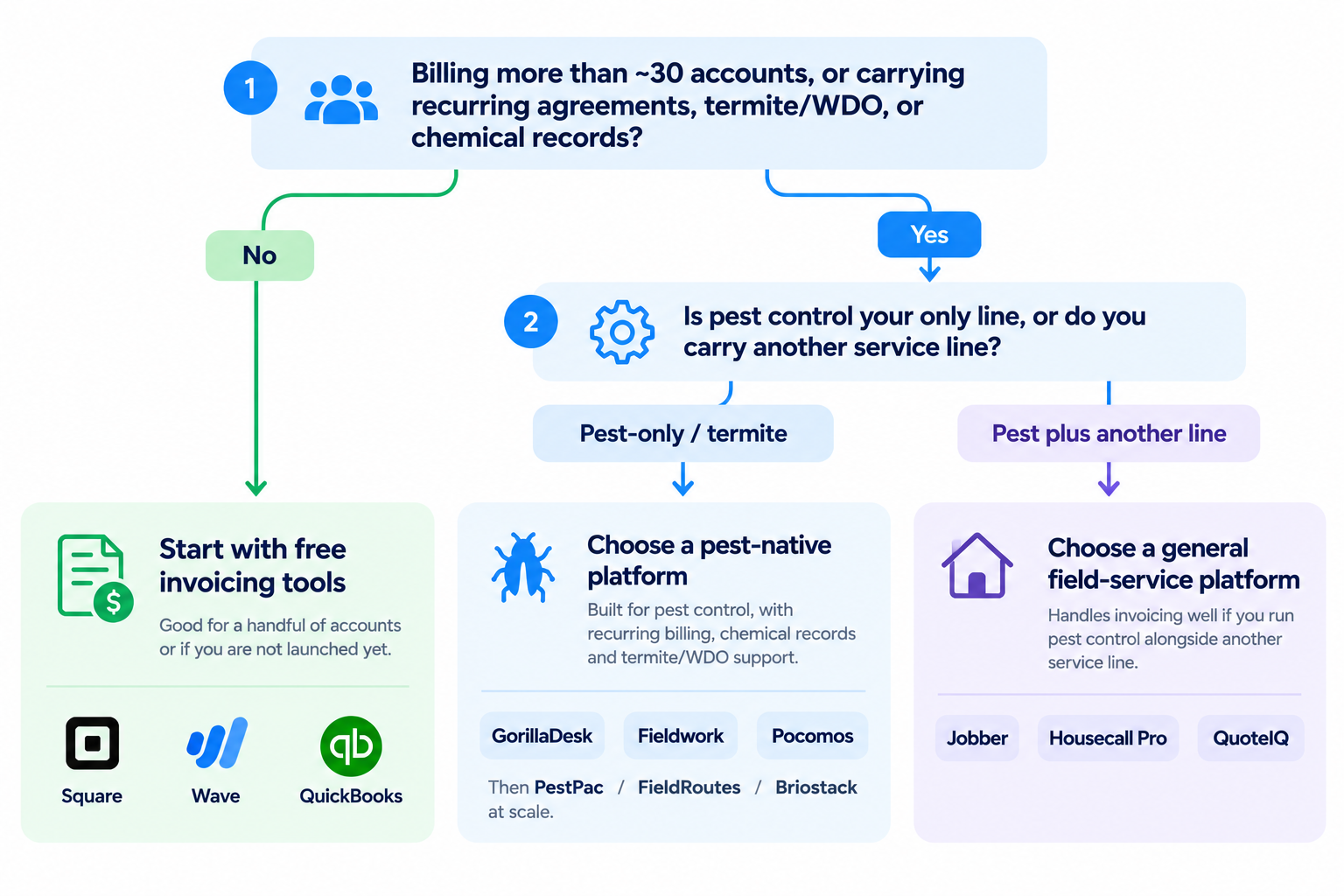
Go pest-native (GorillaDesk, PestPac, FieldRoutes, Briostack) when chemical or WDO data needs to be on or attached to the invoice. Termite work, commercial accounts, and any book where customers ask for application records with their bill belong here. The invoice is also a compliance artifact, and a tool that treats it as one saves you from keeping a second system.
A generalist (Jobber, Housecall Pro) is enough when your billing is residential recurring service without a documentation requirement. You get a cleaner, often cheaper invoicing experience, and you accept keeping chemical records somewhere else if you need them at all.
This guide leads with the operating owner running recurring accounts. If you are a solo operator just starting out, the cheapest published entry points that still automate recurring billing are GorillaDesk Basic and Jobber Core; if you run a multi-branch or commercial-heavy operation, the quote-based pest-native platforms are built for the documentation and reporting you will need, and the demo is worth the time it costs.
For the broader comparison of scheduling, routing, CRM, billing, and pricing, see RankBeaver’s best pest control software guide. If route density and technician drive time are the bigger problem, the pest control routing software guide goes deeper on that workflow.
What it costs
Three of the six publish their pricing, and three quote only. That split is useful information in itself: published pricing generally signals a product sold to owners who buy without a sales call, while quote-only pricing signals a product sold into larger operations through a demo.
| Platform | Entry plan | Mid plan | Top published plan | Notable billing cost detail |
|---|---|---|---|---|
| GorillaDesk | Basic $49/mo per route | Pro $99/mo per route | Growth $149/mo per route | Per route, not per user; SMS is a paid add-on |
| Jobber | Core $49/mo ($29 annual) | Connect $139/mo ($99 annual) | Plus $499/mo ($399 annual) | Automatic payments and QuickBooks sync start on Connect; +$29/user |
| Housecall Pro | Basic $59/mo annual | Essentials $149/mo annual | Max $299/mo annual | QuickBooks sync on Essentials; recurring plans on Max; +$35/user on Max |
| PestPac | Not published | Not published | Not published | Quote only; expect a sales call and multi-week onboarding |
| FieldRoutes | Not published | Not published | Not published | Priced by active customer volume; no free trial |
| Briostack | Not published | Not published | Not published | Entry tier exists; higher tiers quote only |
Pro tip: When comparing the published plans, price the tier that unlocks autopay and QuickBooks sync, not the entry tier. On Jobber that is Connect, not Core; on Housecall Pro it is Essentials, not Basic. The headline starting price rarely includes the two features that pay for the software.
Card-processing rates are a real cost that the plan price hides. Housecall Pro starts as low as 2.59%, Jobber is 2.9% plus 30 cents, and GorillaDesk runs on your own Stripe or Square account at their rates. On a book doing most of its volume on cards, a third of a percent compounds into a meaningful number over a year, so factor it in alongside the subscription.
If you only need to send invoices
A brand-new solo operator with a handful of accounts may not need field service software at all yet. Standalone accounting tools invoice cleanly and cost less.
For a deeper comparison of invoice-first tools, pricing models, and payment processing, see our pest control invoice software guide. If you are still building the company around those first accounts, how to start a pest control business covers the operating side.
QuickBooks Online starts around $20 to $38 per month depending on tier and gives you the deepest accounting and tax integration of anything mentioned here, which matters if an accountant already runs your books in it. FreshBooks starts around $23 per month with simple recurring invoices and online payment. Neither schedules a treatment, dispatches a technician, or logs a chemical application anywhere in the product.
That is the catch. The moment you are scheduling recurring routes and want the invoice to fire off the completed job automatically, a standalone accounting tool cannot do it, and most pest control companies hit that wall within a year. Use one as a deliberate stopgap, not as the system you expect to grow into. When you are ready to connect billing to the schedule, how to set competitive pest control prices covers the pricing side of the same workflow.
How to switch without losing your billing history
Most platforms, including the ones here, import customer, job, and invoice data by CSV, so switching is a defined process rather than a leap.
- Export from your current system. Pull customers, service addresses, recurring schedules, and open invoices to CSV.
- Import to the new platform and spot-check the recurring schedules. These map less cleanly than customer records, and a schedule that did not carry over is a recurring invoice that will silently stop firing.
- Run both systems in parallel for about a week on active invoices. This catches anything that did not map before you cancel the old subscription.
- Cut over fully, then cancel. Only after the parallel week confirms nothing is dropping.
One detail that surprises people: some platforms import contact and balance data but not complete past billing history. GorillaDesk, for example, imports contact information, service and billing addresses, notes, and a starting balance, but not full past service or billing history. If you need years of invoice history preserved, confirm that specifically before you migrate, because it is the kind of thing nobody checks until it is gone.
Frequently asked questions
Q.1 What is the best billing software for a small pest control business?
For a small residential crew, GorillaDesk Basic at $49 per month per route and Jobber Core at $49 per month ($29 annually) are the strongest published-price options that still automate recurring billing. GorillaDesk is pest-native with chemical tracking built in; Jobber has the cleaner general invoicing experience. The deciding factor is whether you need chemical or WDO data on the invoice, which points you to GorillaDesk.
Q.2 How much does pest control billing software cost?
Published pricing runs from about $20 per month for a standalone accounting tool like QuickBooks Online to roughly $50 to $150 per month for pest-focused field service software at the tier that includes autopay and recurring billing. Pest-native enterprise platforms like PestPac and FieldRoutes quote only and are not published, so budget for a sales call and a higher number if your operation needs that depth.
Q.3 What is the difference between pest-native and general field service billing software?
Pest-native software puts chemical usage and WDO inspection data onto the invoice itself, which commercial and termite accounts often require for documentation. General field service tools handle recurring invoicing, autopay, and scheduling well but do not log chemical applications on the bill. If your book is residential-only without a documentation requirement, a generalist is usually enough; if it is commercial or termite-heavy, pest-native earns its place.
Q.4 Does pest control billing software integrate with QuickBooks?
Yes, most do, though which version differs. Jobber, GorillaDesk, and Housecall Pro all sync with QuickBooks Online, and on Jobber and GorillaDesk that sync sits on the mid tier (Connect and Pro respectively) rather than the entry plan. Confirm whether a platform supports QuickBooks Desktop specifically if your bookkeeper still runs the desktop version, since Online support is far more common.
Q.5 What billing feature matters most for recurring pest control accounts?
Recurring-invoice automation tied to the service schedule, so the invoice generates and sends the moment a scheduled job is marked complete, with no manual trigger. In a trade where 74% of income is recurring, the gap between completing a service and remembering to bill it is where revenue leaks, and automation is the only thing that closes it reliably. Autopay with a card on file is the close second.
Q.6 Can customers pay pest control invoices online automatically?
Yes. GorillaDesk (Pro and up), Jobber (Connect and up), and Housecall Pro all support autopay with a saved card, charging recurring accounts automatically on the service schedule. Setting customers up on autopay is the single most effective way to shorten the time between finishing a job and getting paid, because an account on a card on file never generates a reminder call in the first place.
Conclusion
Pick the one billing task that costs you the most office time right now, whether that is chasing unpaid invoices, re-entering data into QuickBooks, or remembering to bill recurring accounts, and shortlist only the platforms that fix that task. Then demo two, run the parallel week, and switch. The best billing software is the one that makes the invoice fire without anyone thinking about it, because in a book that is three-quarters recurring, that is most of the job.
Billing software only pays off if you have accounts to bill. If the real bottleneck is that the phone is not ringing, start with pest control marketing. For organic local visibility, the pest control SEO guide covers Maps, service-area pages, reviews, and measurement.