You are running the business off a phone, a spreadsheet and a shoebox of signed service tickets, and it worked fine at forty accounts. At a hundred and forty it does not. Somebody's quarterly got skipped, two invoices went out late, and you spent Sunday evening rebuilding next week's route by hand.
Or the opposite problem: you are paying a few hundred a month for a platform built for a twenty-truck company and using perhaps a fifth of it.
This guide compares the best pest control software worth considering in 2026, with the two things this category tends not to publish in one place: real pricing, and what it costs you to move. Every price below came from the vendor's own page on September 3, 2026, and where a vendor publishes nothing, it says so.
The short version
For a solo operator or a two-truck pest control business, GorillaDesk and Fieldwork are the strongest starting points: both are priced for small operations, both publish what they charge, and neither raises the bill when you add office staff. Pocomos is worth a look at the same size and prices by customer count instead.
If you run pest control alongside another service line, Jobber handles both from one system and carries the deepest review history in the category. Housecall Pro is the simplest of the general platforms to get running.
Past three or four technicians with real route density, FieldRoutes, PestPac and Briostack are the established pest-native options and are worth the quote request. ServiceTitan serves large multi-market operations across trades.
What's in this guide
- What pest control software actually does
- Pest control software: pest-native or general?
- How we picked the best pest control software
- The comparison table
- The platforms, one by one
- What pest control software costs: four pricing models
- How to run a trial that tells you something
- Pest control software integrations worth checking
- If this is your first system
- If you are replacing what you have
- What switching pest control software actually costs
- What implementation looks like
What pest control software actually does
Pest control software is a field service platform built to run a pest control business end to end. Strip away the feature lists and every product here is doing six jobs.
| Job | What it replaces |
|---|---|
| Scheduling and route sequencing | Rebuilding next week's route by hand on Sunday |
| Recurring service agreements | A calendar full of repeating events that do not bill themselves |
| Customer records and service history | The shoebox, and the memory of which technician treated what |
| Chemical and material tracking | A paper log, when several states want records of what was applied, where, at what rate |
| Invoicing and card-on-file payment | Chasing money for work you already did |
| A technician mobile app | Phone calls to the office to ask what is next |
The one that pays for the software on its own is card on file at time of service. Everything else saves you evenings. That one saves you receivables, and receivables are what quietly strangle a growing route.
Pest-native platforms add a seventh job that general platforms do not attempt: generating WDO and termite inspection forms to the standard your state and the real estate transaction expect.
Pest control software: pest-native or general?
This is the first real decision, and it comes before any brand name. The platforms split into two groups that look similar in a feature list and behave differently on a route.
Pest-native platforms are built for this trade: PestPac, FieldRoutes, GorillaDesk, Briostack, Pocomos. General home-service platforms serve plumbing, HVAC, cleaning and pest alike: Jobber, Housecall Pro, ServiceTitan, Workiz. Both are sold as pest control business software and both will run a route, which is why the distinction often goes unnoticed until the first termite job.
Four things separate them, and they are four things a pest control business does every day.
| Capability | Why it matters in pest control |
|---|---|
| Recurring service plans | Quarterly and bi-monthly agreements are 74% of industry revenue. A platform that treats recurring work as a repeating calendar event rather than a billable agreement creates monthly reconciliation work |
| Route sequencing at density | Once you have sixty accounts across four zip codes, drive time is your largest hidden cost. Pest-native routing optimizes the order of stops; general platforms more often show you a map and let you decide |
| Material and chemical tracking | Several states require records of what was applied, where and at what rate. Pest-native tools capture this at the stop as part of the workflow. On general platforms it is a custom field you maintain |
| WDO and inspection forms | Termite and real-estate inspection work runs on standardized forms. Pest-native platforms generate them |
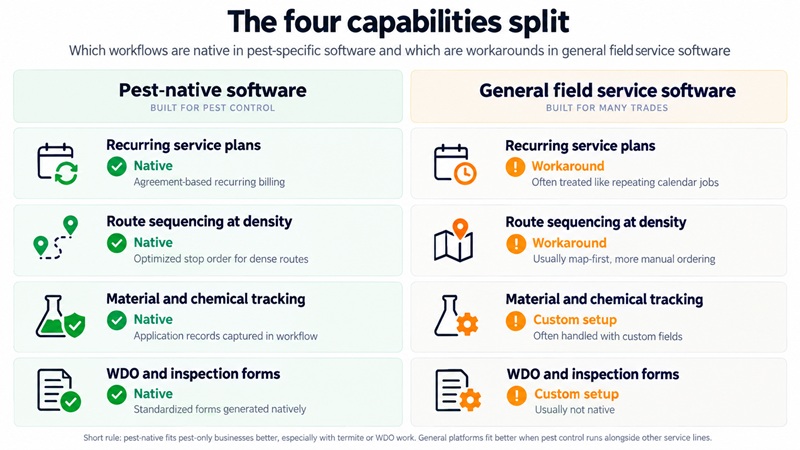
The short rule: if pest control is your only line of business and you carry termite or WDO work, pest-native will fit better. If you run pest control alongside lawn care or another service line, a general platform often fits better, because it runs both from one system instead of two.
Pro tip: Test recurring plans first in any trial, before anything else. Create a quarterly agreement, skip a service, then reschedule it mid-cycle. How cleanly the software handles that one sequence tells you more than an hour of feature comparison.
How we picked the best pest control software
Rating data comes from G2, which publishes verified review counts under a stated methodology covering more than 2,500 reviews across 61-plus products in this category, with no paid placement. We used it because it is the only independent, sample-sized rating source available here, and because a 4.8 attached to 43 reviews and a 4.8 attached to 7 are different claims.
Pricing comes from each vendor's own published pricing page, checked September 3, 2026. Where a vendor does not publish pricing, we say so rather than estimating, because a specific figure with no source behind it is worse than an honest blank.
We included platforms built to dispatch a technician and used by pest control operators, whether pest-native or general. We excluded general business tools not built for field service.
Two honest limits. We have not run every platform on a live route, so this is a buyer's research document rather than a hands-on review. And G2's pest control category does not list every product worth considering, so several good platforms carry no rating here. Both are marked in the table rather than smoothed over.
The comparison table
Ratings from G2, prices from vendor pricing pages, all as of September 3, 2026. Prices are the lowest published tier on annual billing where offered.
| Platform | Type | G2 rating | Reviews | Starting price | Pricing model | Free trial |
|---|---|---|---|---|---|---|
| GorillaDesk | Pest-native | 4.8 | 43 | $49/mo | Per schedule | Yes |
| Pocomos | Pest-native | 4.8 | 10 | $99/mo | Per active customer | Not stated |
| Jobber | General | 4.6 | 518 | $29/mo | Per user | 14 days, no card |
| FieldRoutes | Pest-native | 4.4 | 266 | Not published | Per active customer | No |
| ServiceTitan | General, enterprise | 4.4 | 368 | Not published | Quote only | No |
| Simpro | General | 4.2 | 464 | Not published | Quote only | Not stated |
| PestPac (WorkWave) | Pest-native | 4.1 | 132 | Not published | Quote only | Not stated |
| Fieldwork | Pest-native | Not listed | n/a | $59/mo | Per field technician | 14 days, no card |
| Housecall Pro | General | Not listed | n/a | $59/mo | Per user | 14 days, no card |
| Briostack | Pest-native | Not listed | n/a | Not published | Quote only | Not stated |
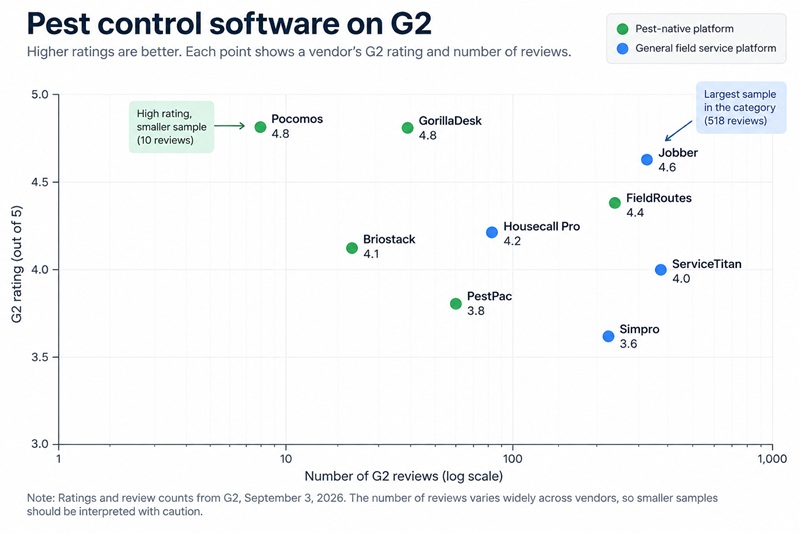
Five of ten publish a price. That is the state of this category in 2026, and it is worth knowing before you start filling in demo forms.
The platforms, one by one
GorillaDesk
Pest-native, built for small and mid-size operations, and the highest-rated pest-focused platform on G2 with a meaningful sample at 4.8 from 43 verified reviews.
Best for: solo operators through roughly four trucks, and anyone who wants to see the price before speaking to a salesperson.
What stands out: published pricing at $49, $99 and $149 a month, with annual billing at $539, $1,089 and $1,639. The entry tier already carries material tracking, routing up to 25 stops, automated email and SMS, and 20 built-in reports. The $99 Pro tier adds subscription billing, advanced routing, online booking, a customer portal, e-signatures, GPS tracking and QuickBooks, Zapier and open API integrations.
Worth knowing: seats are counted by schedule rather than by head, so unlimited admin users cost nothing and only technicians assigned to a schedule need a paid seat. Multi-branch support arrives at the $149 Growth tier. SMS runs $5 a month plus text credits.
Jobber
A general home-service platform carrying the deepest review history in G2's pest control category: 4.6 from 518 reviews, more than ten times the next largest pest-focused sample.
Best for: operators running more than one service line, and buyers who weigh a long track record heavily.
What stands out: four published tiers from $29 to $399 a month on annual billing, a 14-day trial with no card required, and strong quoting, invoicing and customer communication. A business running pest control and lawn care operates both from one system.
Worth knowing: it is general rather than pest-native, so there is no WDO form generation and chemical records are built with custom fields. Additional users are $29 a month each. Termite-heavy operations usually land on a pest-native platform for that reason.
Pocomos
Pest-native, rated 4.8 on G2 from 10 reviews, so read that figure as directional rather than settled, and one of only two platforms here publishing per-customer pricing.
Best for: small and growing pest-only operations that would rather pay by book size than by headcount.
What stands out: fully published tiers at $99 a month for up to 20 active customers, $159 for 21 to 50, $209 for 50 to 300 and $275 for 300 to 500, with custom pricing above that and a separate door-to-door plan. Technician count does not affect the bill, which suits a business hiring faster than it is growing its book.
Worth knowing: the review sample is the smallest of any rated platform here. The entry tier's 20-customer ceiling is low enough that most operating businesses start at $159 or above.
FieldRoutes
Pest-native, now a ServiceTitan company, rated 4.4 from 266 verified reviews and built around route density.
Best for: multi-truck operations at the point where route optimization is worth real money.
What stands out: routing and scheduling at scale, which is the problem the product exists to solve, plus mature recurring plan management and customer-facing automation.
Worth knowing: pricing is quote-only and based on active customer count. The company states it offers no free trial, because each implementation is tailored to the business. Evaluating it means committing to a sales and demo process rather than testing it yourself.
PestPac by WorkWave
One of the longest-established platforms in the trade, rated 4.1 from 132 verified reviews, and the system many technicians will already know from a larger employer.
Best for: established multi-branch companies, particularly termite-heavy ones with commercial accounts.
What stands out: depth. Termite and WDO workflows, complex recurring structures, commercial account management and compliance reporting are all mature in a way newer products have not had time to match.
Worth knowing: quote-only pricing. The breadth that serves a large operation is more product than a one-truck business needs, and the familiarity technicians have with it cuts both ways, since opinions formed at a previous employer are usually about that company's configuration rather than the software.
Fieldwork
Pest-native and priced for small operations, with published tiers at $59, $79 and $99 a month.
Best for: small pest control businesses with a couple of technicians and office help, who want pest-specific workflows at a published price.
What stands out: office staff are free and do not count as users, so only dispatched technicians occupy a paid seat. A 14-day trial runs without a credit card. The $79 tier is positioned as the standard choice.
Worth knowing: it does not appear in G2's pest control category, so there is no verified third-party rating to weigh alongside the price. That means the trial matters more here than it does for a platform with 266 reviews behind it.
Housecall Pro
A general home-service platform with the clearest tiering of any product here: $59 a month for one user, $149 for five and $299 for eight, all on annual billing.
Best for: small operations that want simple published pricing and do not need pest-specific workflows.
What stands out: transparent tiers with user counts stated up front, a 14-day trial with no card, and straightforward scheduling, invoicing and payment.
Worth knowing: it is not listed in G2's pest control category, so there is no verified rating for this use case. Users beyond a plan's allowance run $75 to $100 a month, the steepest per-head cost in this comparison, so it rewards staying inside a tier.
Briostack
Pest-native, widely used, and another platform technicians often recognize from a previous employer.
Best for: growing pest-only operations, best evaluated head to head against FieldRoutes.
What stands out: built specifically around pest control routes and recurring service, with strong customer communication automation.
Worth knowing: no listing in G2's pest control category and no published pricing, so there is less independent evidence to weigh than for the rated platforms. Both answers come from the demo.
ServiceTitan
Enterprise field service software rated 4.4 from 368 verified reviews, serving large home-service companies across multiple trades.
Best for: large multi-market operations running twenty-plus trucks, where reporting depth and workforce management justify enterprise software.
What stands out: reporting and management of large technician teams, and a platform that keeps working at a scale most field service products do not reach.
Worth knowing: quote-only, and built for a scale most pest control businesses will not need. FieldRoutes is the same company's pest-focused product and is the more natural fit for a pest control operation.
Simpro
A general field service platform rated 4.2 from 464 verified reviews, the second-deepest sample in G2's pest control category.
Best for: operations with a project and job-costing side, such as commercial contracts with materials and staged work.
What stands out: job costing and inventory management run deeper than in most products here, and the review sample is substantial.
Worth knowing: quote-only pricing, and the project orientation is more than a purely recurring residential route requires.
What pest control software costs: four pricing models
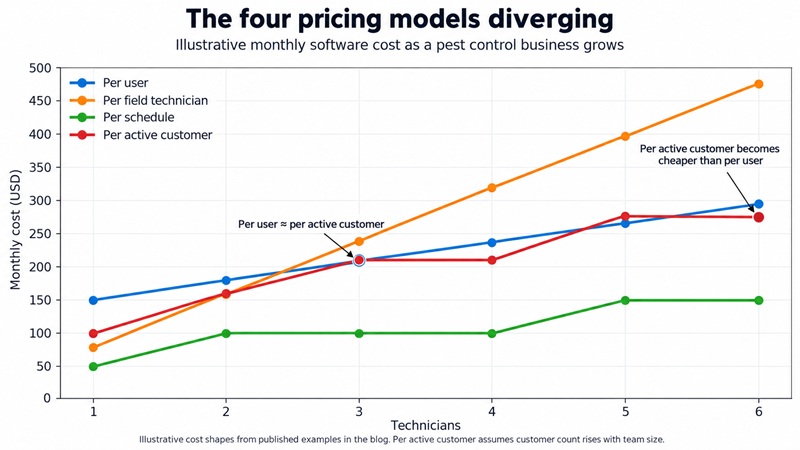
Here is the part that catches buyers out. These platforms are not priced the same way, so comparing monthly figures tells you very little about what you will pay in two years. Every piece of software for pest control business use falls into one of four models.
| Model | Who uses it | What happens as you grow |
|---|---|---|
| Per user | Jobber, Housecall Pro | Every hire raises the bill. Jobber adds $29 a month per user; Housecall Pro adds $75 to $100 beyond a tier's allowance |
| Per field technician, office free | Fieldwork | Dispatched technicians occupy seats; office staff do not. Adding an admin costs nothing |
| Per schedule | GorillaDesk | Unlimited admin users at no cost, with paid seats tied to schedules rather than headcount |
| Per active customer | Pocomos, FieldRoutes | The bill scales with the size of your book, which is the number you are working to increase |
A worked comparison
Three technicians, one office admin, 300 active accounts. Published prices only, annual billing.
| Platform | Tier | Monthly | How it got there |
|---|---|---|---|
| Housecall Pro | Essentials | $149 | Five-user allowance covers three technicians plus admin |
| Jobber | Grow | $207 | $149 base with one user, plus $29 for each of two more technicians |
| Pocomos | Large | $209 | 50 to 300 active customers band; technician count does not change it |
| Fieldwork | Business | $237 | $79 per field technician for three; the admin is free |
| GorillaDesk | Pro | From $99 | Per-schedule seating, so the total depends on how many schedules you run. Confirm this one for your setup |
Our arithmetic from published prices, not vendor quotes. Tiers are not feature-equivalent, so read this as a cost shape rather than a like-for-like comparison.
Now move the same business to 450 accounts and six technicians and the order changes. Housecall Pro's five-user allowance is exceeded, so two extra users at $75 to $100 push it past $299. Jobber's Grow tier reaches $294. Pocomos crosses into the 300 to 500 band at $275 flat regardless of the three extra hires. The platform that was cheapest becomes among the most expensive, purely because of the model.
The model deserving the most thought is per-active-customer, because it scales with the exact metric your business exists to increase. That can be entirely reasonable, since a larger book should support a larger software bill. It also means the number quoted at 200 accounts is not the number you pay at 600, which is worth pinning down in writing before signing.
Pro tip: Ask every vendor for the price at your current size and at double it, in the same email. The gap between those two numbers is the real cost of the platform, and asking for both at once makes a vague answer much harder to give.
How to run a trial that tells you something
Most trials get spent clicking around an empty demo account, which proves nothing. Fourteen days is enough to answer the questions that matter if you use it deliberately.
Load real data. Enter twenty of your actual accounts with their real addresses, real service frequencies and real prices. Pest control software demos are built to look good on clean data, and your data is not clean. The accounts that break things are the ones with a skipped quarterly, a partial payment or two properties under one name.
Then run this sequence in order:
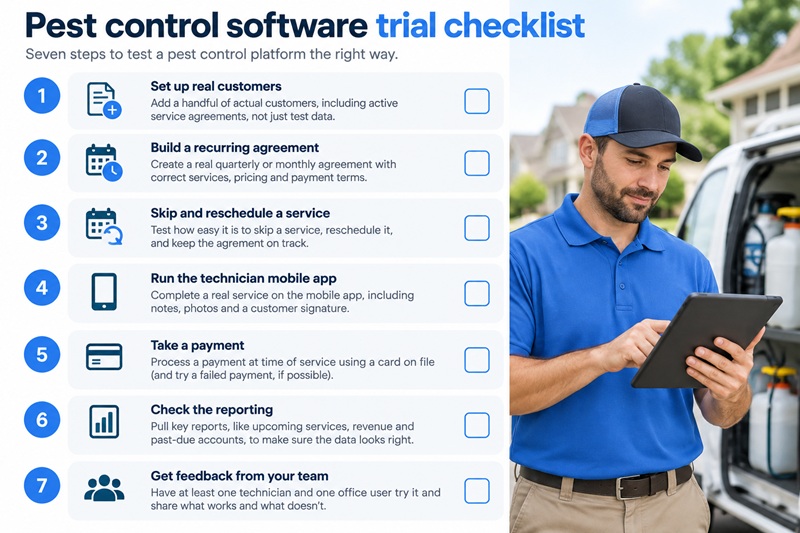
- Build a quarterly recurring agreement and confirm it bills on its own schedule rather than needing a monthly nudge.
- Skip a service and reschedule it mid-cycle. Watch what happens to the billing date. This single test separates the platforms more than any feature list.
- Sequence a real route of twelve stops and compare the drive time to how you would have ordered it yourself.
- Take a payment with a card on file, then issue a partial refund.
- Log a chemical application with rate and location, then try to retrieve it three months later the way an inspector would ask for it.
- Send the mobile app to your technician, not just to yourself, and ask whether they would use it in the rain with gloves on.
- Email support a real question and time the response. You are buying that response time for years.
Pro tip: Run the same seven steps on both finalists in the same week, with the same twenty accounts. Comparing a fresh trial against a six-month memory of the other product is not a comparison.
Pest control software integrations worth checking
The platform will not be the only system you run, and the seams are where the time goes.
- Accounting. QuickBooks is the common integration and the one to verify first, since re-keying invoices removes most of what the software saved you. Confirm whether the sync is two-way and how it handles partial payments.
- Payments. Most platforms include card processing, and the rate is part of the true cost. A processing rate half a point higher costs a $150,000 route roughly $750 a year, which is more than a tier upgrade.
- Reviews. Automated review requests after a completed job are built into several of these products and are worth more to a pest control business than most features, since reviews drive both local ranking and conversion.
- Zapier or an open API. The escape hatch for anything the platform does not do natively. GorillaDesk includes both at the $99 tier.
- Your phone system. Call tracking matters once you spend real money on marketing, because otherwise you cannot tell which channel produced the call.
Pro tip: Ask what the card processing rate is before you compare subscription prices. On a $150,000 route, half a percentage point is about $750 a year, which is more than the gap between most tiers in this comparison.
If this is your first system
You are coming off a spreadsheet, a phone and a paper ticket book. The instinct is to buy the most capable platform you can afford. Buy the smallest one that does four things instead.
- Bills a card on file at the time of service. Chasing payment for completed work is unpaid labor, and this is the single most valuable thing software takes off your plate.
- Handles recurring plans as agreements rather than repeating calendar entries, so a skipped quarterly reschedules without breaking the billing.
- Sequences a route rather than only showing pins on a map.
- Sends automated appointment reminders, which cuts the not-at-home stops that quietly eat a solo operator's day.
Everything else can wait. Customer portals, online booking, commission tracking and sales pipelines are real features solving problems you do not have yet.
Pest control software for small business buyers should weigh the free trial heavily, because it is the only evidence that costs nothing. Jobber, Housecall Pro and Fieldwork all run 14 days without a card. GorillaDesk offers a trial. FieldRoutes offers none. That difference tells you something about how each product expects to be bought.
Budget $49 to $99 a month at this stage. Against the roughly $825 a month a $150,000 route should be spending on marketing, software is a small line, and underbuying is much cheaper to correct than overbuying.
New to this entirely? How to start a pest control business covers what to have in place before software is your problem.
If you are replacing what you have
A different purchase with different risks. You already have the workflow. What you are buying is a change, and the change is where the cost sits.
Be specific about what is actually wrong with your current system. "We hate it" is not a requirement. The real reasons operators move are usually one of four, and each points at a different replacement:
- The bill grew faster than the business. Usually a pricing-model mismatch rather than a bad product. Check the four models above before assuming you need to switch at all.
- Routing cannot cope with the density you built. A genuine reason to move, and it points pest-native.
- Recurring billing needs manual correction every month. The most common reason, and the most expensive in staff hours.
- Support stopped answering. Hard to verify from the outside, which is why the trial should include emailing support.
Check whether you are paying for scale you do not have. A platform bought when you planned ten trucks is expensive at three.
Then check the opposite. If your office manager maintains a spreadsheet alongside the software, the software is undersized, and that spreadsheet names the missing feature precisely.
Established operators should revisit the pest-native question too. Businesses that started in pest control and added lawn care often find a general platform now fits better than the pest-native one they began with. Businesses that added termite work usually find the reverse.
\
What switching pest control software actually costs
The subscription is the visible cost. The migration is the real one, and it is the part this category tends not to price.
Ask these five questions before signing anything, and get the answers in writing.
| Question | Why it matters |
|---|---|
| What exports, and in what format? | Customer records usually export cleanly. Service history, chemical application records and signed documents frequently do not, and those are what a state inspector asks for |
| What happens to recurring plans mid-cycle? | Agreements billed quarterly rarely align with a migration date. Ask specifically how a plan billed three weeks ago transfers |
| Who performs the data import, and is it included? | Some vendors handle it as part of onboarding, some charge for it, some provide a template |
| How long is the overlap? | You will run both systems for a period. Two to six weeks is normal. Budget for paying twice |
| What is the notice period on the contract you are leaving? | Annual agreements often auto-renew with 30 to 60 days' notice required, and finding that out in month eleven is expensive |
Migrate between seasons, never during one. In most of the country that means late fall or midwinter, when stop counts are lowest and a week of friction costs least. Moving platforms in April, with swarm season arriving and the route at full load, is how a good decision becomes a bad quarter.
Keep the old system readable for a year. Downgrade rather than cancel where you can. The service history you could not export is the history you will want the one time a customer disputes a treatment.
Pro tip: Before migrating, export everything the old platform will give you and store it somewhere you control. Do it while you are still a paying customer with support access, not after you have given notice.
What implementation looks like
Even a smooth move is not instant. A realistic timeline for a small operation:
| Stage | Time | What happens |
|---|---|---|
| Data preparation | 3 to 5 days | Cleaning the customer list before it moves. Duplicates and dead accounts are cheaper to remove now than later |
| Import and verification | 1 week | Records land, then somebody checks a sample against the old system. Do not skip this |
| Rebuilding recurring plans | 3 to 7 days | The step that consistently takes longer than expected, because agreements carry pricing history and start dates |
| Route rebuild and testing | 3 to 5 days | Sequences rebuilt and compared against current drive times |
| Parallel running | 2 to 4 weeks | Both systems live. Invoicing from the new one, checking against the old |
| Technician training | 1 to 2 days | Usually the easiest part. Field staff adapt to a new app faster than office staff adapt to new reports |
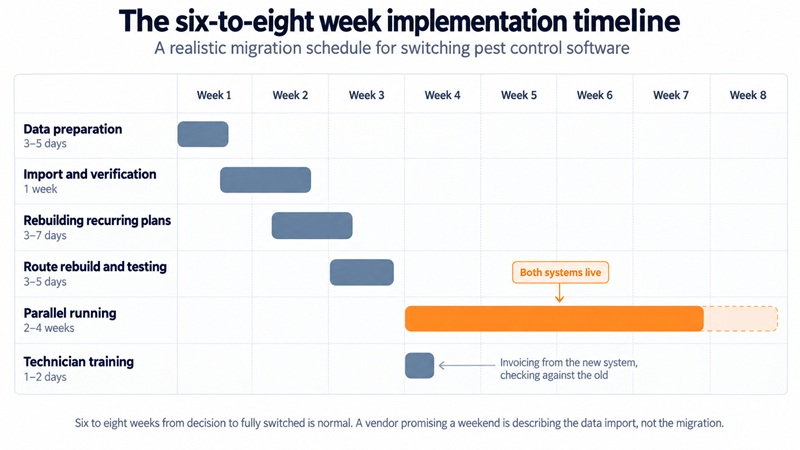
Six to eight weeks from decision to fully switched is normal. A vendor promising a weekend is describing the data import, not the migration.
Software will not fix an empty schedule, and that is the most common disappointment in this category. If the problem is that the phone is not ringing rather than that the route is disorganized, the money belongs elsewhere. You can see where you stand against other companies in your service area with our Benchmark tool, and pest control marketing covers the rest.
Frequently Asked Questions
Q.1 What is pest control software?
Pest control software is a field service platform built to run a pest control business: scheduling and route sequencing, recurring service agreements, customer records and service history, chemical and material tracking for state reporting, invoicing with card-on-file payment, and a technician mobile app. Pest-native platforms also generate termite and WDO inspection forms. Published pricing starts around $29 to $99 a month.
Q.2 What is the best pest control software for a small business?
For a pest-only operation of one to four trucks, GorillaDesk and Fieldwork are the strongest starting points. GorillaDesk is rated 4.8 from 43 verified G2 reviews and publishes pricing from $49 a month, charging per schedule so office staff cost nothing. Fieldwork starts at $59 a month per field technician with free office users. Operators running a second service line alongside pest control are usually better served by Jobber at $29 a month.
Q.3 How much does pest control software cost?
Published prices run from $29 to $299 a month: Jobber at $29, GorillaDesk at $49, Fieldwork and Housecall Pro at $59, and Pocomos at $99. FieldRoutes, PestPac, ServiceTitan, Simpro and Briostack quote per business rather than publishing rates. The real cost is driven by the pricing model more than the headline, since per-user platforms cost more as you hire and per-customer platforms cost more as your book grows.
Q.4 Do I need pest-specific software, or will general field service software work?
General field service software works well when pest control sits alongside another service line and you do not carry termite or WDO work. Pest-native platforms earn their place when you need recurring agreement billing, route sequencing at density, chemical application records for state reporting, or standardized inspection forms. The deciding question is usually whether you produce WDO reports, since general platforms do not generate them.
Q.5 Can I switch pest control software without losing my customer history?
Customer records almost always transfer. Service history, chemical application records and signed documents frequently do not, and those are the records a state inspector may ask for. Before signing, get written answers on what exports and in what format, who performs the import, and how recurring plans billed mid-cycle are handled. Export everything yourself while you still have support access on the old platform.
Q.6 What is the best pest control management software for a growing company?
For operations past three or four technicians where route density is worth real money, FieldRoutes, PestPac and Briostack are the established pest-native options. FieldRoutes is rated 4.4 from 266 verified reviews and PestPac 4.1 from 132. All three quote per business, and FieldRoutes offers no free trial, so budget time for a sales process. ServiceTitan serves larger multi-market companies across trades.
Q.7 How long does it take to implement pest control software?
Six to eight weeks from decision to fully switched is realistic for a small operation: three to five days preparing data, about a week to import and verify, three to seven days rebuilding recurring agreements, and two to four weeks running both systems in parallel. Technician training is usually one to two days. A vendor quoting a weekend is describing the data import rather than the full migration.
Q.8 Which pest control software has a free trial?
Jobber, Housecall Pro and Fieldwork each offer 14 days without a credit card, and GorillaDesk offers a trial. FieldRoutes states it offers none, because each implementation is tailored to the business. PestPac, ServiceTitan, Simpro, Pocomos and Briostack do not publish trial terms. Where a trial exists, load twenty real accounts rather than sample data, since demo data hides the problems your own records will surface.
Conclusion
Pick the two platforms closest to your situation, start trials where they exist, and run the same seven-step test on both in the same week. Build a quarterly agreement, skip a service, reschedule it, take a payment. That sequence is most of what the software has to do well, and everything else on the feature list is a tiebreaker.