The short version
Solo through a few trucks, pest only? GorillaDesk routes up to 25 stops on its $49 tier and adds advanced routing at $99, tied to chemical records. Fieldwork and Pocomos are the other pest-native options at published prices.
Running pest control alongside another line? Jobber and Housecall Pro both route now, Housecall Pro since a May 2026 update, and run your other service from the same system.
Past a few trucks with real route density? FieldRoutes and PestPac are the established pest-native platforms built around dense recurring routes. Both quote per business.
Already locked into a CRM whose routing is weak? A standalone optimizer like OptimoRoute layers on from about $35 per driver a month, at the cost of running two systems.
What's in this guide
- What routing software does, and what it cannot
- First, which problem do you have?
- Pest-capable platforms that route well
- The lever the software cannot pull: route density
- What quietly kills route density
- The multi-week problem unique to pest routing
- Pest routing, general routing, or a standalone optimizer?
- What to actually ask a routing vendor
- How to tell a real drive-time claim from a marketing one
- How to trial a routing tool in a week
The expensive part of a pest route is not the twenty minutes you spend at each house. It is the driving in between, and most of it never lands on an invoice.
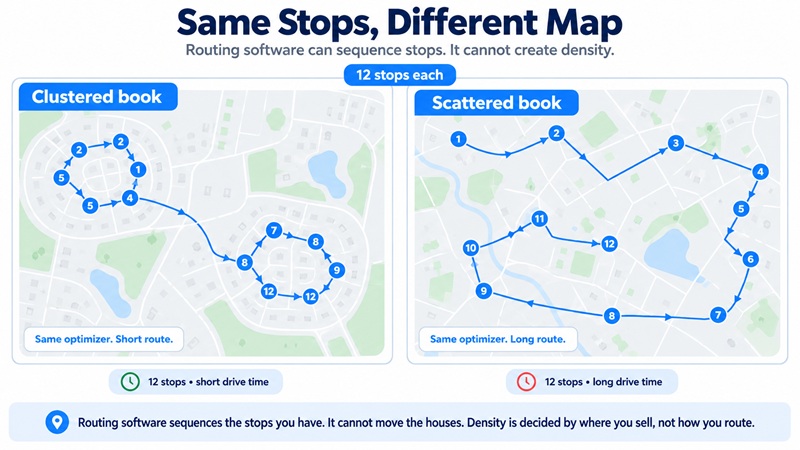
So routing software looks like the fix, and that is how it is sold. What it actually does is narrower: it reorders the stops you already have, and it cannot move the houses. Give it a day where your accounts sit in two neighborhoods and the route it builds is tight. Give it a day where the same number of accounts are spread across the metro and it hands you the least-bad path through a long drive. Same software, same stop count. The difference is where the customers are, and that is the one thing the optimizer cannot change and the one thing the vendors leave out of the headline.
This guide compares pest control routing software on what it actually changes, with pricing from each vendor's own page in September 2026, and it is written by a company that sells none of these tools. Before you compare a single product, section two shows you how to tell whether you have a problem routing software can fix at all.
What routing software does, and what it cannot
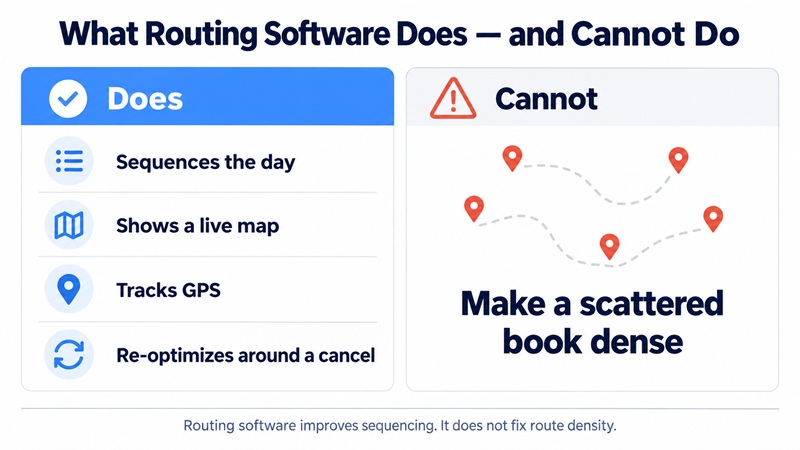
Routing software does four things well and one thing not at all. Knowing which is which is the whole purchase.
What it does:
- Sequences a day's stops into an efficient order instead of the order you booked them.
- Shows a live map so a dispatcher can see where technicians are against where they should be.
- Tracks GPS, which is how you verify a stop happened and answer a customer who says nobody came.
- Re-optimizes around a change, so a cancel or an add-on reshuffles the rest of the day instead of blowing it up.
What it cannot do:
- Make a scattered book dense. The optimizer works with the stops on today's list. If those stops are spread thin, the best possible order through them is still a lot of driving.
This matters because drive time, not treatment time, is the cost that scales against you. A general pest stop is often fifteen to thirty minutes of work, and the driving between stops can cost as much again on a loose route. Industry data puts recurring work at the center of the business: the pest control market ran about $13.4 billion in 2025, with roughly 85% of residential revenue coming from recurring agreements. That recurring base is exactly the work routing acts on, week after week, which is why a small percentage of drive time saved compounds into real money over a year, and why a tool that only tidies the order of an already-scattered route saves less than its marketing suggests.
The software is worth having. It is not worth mistaking for the lever.
Pro tip: Before you shop, pull one real day from last week and count two numbers: how many stops you made and how many miles you drove. Miles divided by stops is your drive-density number, and it tells you in one figure whether your problem is sequencing or scatter.
First, which problem do you have?
Before you compare a single product, find out whether you have a sequencing problem or a density problem, because routing software fixes only the first. The two feel identical from the cab, too much driving and not enough stops, and they have opposite fixes. Half an hour with last week's numbers tells you which one you are looking at, and it is the cheapest half hour in this whole process.
Measure these five for one real week, per truck. Pull them from your existing schedule and a mileage log or your phone's map history; you do not need software to do it.
- Stops per day. Completed stops divided by days worked. Your density headline.
- Drive time per stop. Total windshield time for the week divided by total stops. This is the number routing is supposed to move.
- Windshield hours per week. The raw cost, in the currency you pay it: labor and fuel.
- Revenue per stop. Weekly route revenue divided by stops. Tells you what one recovered stop is worth.
- Longest drive between two consecutive stops. The scatter flag. One number, the worst gap in the week.
Then read the result honestly.
- Stops cluster, drive time per stop is low, long gaps are rare. Your book is dense. Sequencing is the remaining gain, and routing software will help. Go compare products.
- Drive time per stop is high and you keep finding long gaps between consecutive stops. You have a scatter problem, and no optimizer fixes it. The money is in territory and service-day design first, the next two sections. Buying software now just optimizes a bad map.
- Some days dense, some days scattered. Your service-day assignment is the problem, not sequencing. Regroup accounts by neighborhood onto shared service days before you spend anything, which costs nothing but a few phone calls.
The point of the exercise is to stop you buying a tool for a problem it cannot solve. That is the most common and most expensive mistake in this category, and it is the one every vendor page is quietly happy to let you make.
Pro tip: Keep these five numbers and re-run them each quarter. Density erodes slowly, and the quarterly check catches it while it is still a few reassigned accounts rather than a route you have to rebuild.
Pest-capable platforms that route well
Past the standalone optimizers, these are the platforms that route a pest business and run it. Pricing is from each vendor's own page in September 2026. Ratings are from G2, with sample sizes shown, because a rating on 43 reviews and one on 10 are different claims.
| Platform | Type | Starting price | Routing depth | G2 (reviews) |
|---|---|---|---|---|
| GorillaDesk | Pest-native | $49/mo | Up to 25 stops at entry; advanced at $99 | 4.8 (43) |
| Fieldwork | Pest-native | $59/mo | Pest-tuned, included | Not listed |
| Pocomos | Pest-native | $99/mo | On the entry plan | 4.8 (10) |
| Jobber | General | $29/mo (annual) | General route optimization | 4.6 (518) |
| Housecall Pro | General | $59/mo (annual) | Route-based scheduling (added May 2026) | Not listed |
| QuoteIQ | General | $29.99/mo | Route optimization at Pro ($149.99) | Not listed |
| FieldRoutes | Pest-native | Quote only | Dense multi-stop, built for density | 4.4 (266) |
| PestPac | Pest-native | Quote only | Optimization plus territory management | 4.1 (132) |
| Briostack | Pest-native | Quote only | Pest-native recurring routing | Not listed |
| ServiceTitan | General, enterprise | Quote only | Advanced, enterprise dispatch | 4.4 (368) |
GorillaDesk
Best for: solo operators through about four trucks who want pest-native routing tied to chemical records at a published price.
Pest-native and the highest-rated pest-focused platform on G2 with a real sample, 4.8 from 43 reviews. The $49 entry tier sequences routes up to 25 stops; advanced routing arrives at the $99 Pro tier, alongside subscription billing and the QuickBooks integration. Seats count by schedule, so office staff cost nothing. For a small pest-only operation, routing, chemical tracking and billing sit in one workflow.
Fieldwork
Best for: a small pest-native shop that wants pest-tuned routing at a published price and free office seats.
Published tiers at $59, $79 and $99, with only dispatched technicians occupying a seat and office staff free. Routing is built for pest workflows rather than adapted from a general tool. Fieldwork is not listed in G2's pest control category, so there is no third-party rating to weigh, which makes the free 14-day trial the evidence that matters most.
Pocomos
Best for: a small, growing pest-only operation that prefers to pay by customer count rather than by technician.
Pest-native, rated 4.8 on G2 from 10 reviews, so read that as directional. Route optimization is on the entry plan, and pricing scales with the size of the book from $99 a month, leaving technician count out of the bill. That model suits a business hiring faster than its customer list grows. The small review sample is the main reason to lean on a trial here.
Jobber
Best for: an operator running pest control alongside another service line, and buyers who weigh a long track record heavily.
The deepest review history in the category, 4.6 from 518 G2 reviews. Jobber includes route optimization and runs a second service line from one system, which is its case for a mixed operation. Its routing is a general field-service feature rather than pest-tuned, so it does not weigh the multi-week recurring cycle the way a pest-native tool does, and there is no chemical or WDO handling. Additional users are $29 a month each. For a shop where pest is one line of several, one system beats two.
Housecall Pro
Best for: a small operation that wants simple published tiers and now has routing built in.
Published pricing at $59, $149 and $299 a month on annual billing. Housecall Pro added route-based scheduling in a May 2026 release, so comparisons written before then that say it has no routing are out of date; it now groups and sequences a technician's stops for the day. It is general rather than pest-native, so chemical records are not part of it, and the routing is not tuned to recurring pest cycles specifically. Users beyond a tier's allowance run $75 to $100 a month, so it rewards staying inside a tier.
QuoteIQ
Best for: a solo or small operator who wants routing bundled with invoicing and follow-up at a published flat rate.
Five flat tiers from $29.99 to $699, with users included per tier rather than billed per seat. Route optimization for multi-stop technician schedules arrives at the Pro tier ($149.99), alongside the QuickBooks integration and automation. It is general rather than pest-native, so there is no chemical or WDO handling. For an operator whose need is routing plus billing in one bundle rather than pest compliance, the flat pricing is the appeal.
FieldRoutes
Best for: multi-truck pest operations at the point where route density is worth real money.
Pest-native, built around dense recurring routes, and rated 4.4 from 266 G2 reviews. FieldRoutes is the former PestRoutes and is now a ServiceTitan company, a lineage several comparison pages get wrong by still attaching it to WorkWave. Its routing and recurring-schedule management are the problem the product exists to solve, which is why it fits an operation running many stops across multiple technicians. Pricing is quote only and based on active customer count, and the company states it offers no free trial because each setup is tailored, so evaluating it means a sales process rather than a self-serve trial. For a one-truck route it is more platform than the job needs, which is a reason to grow into it, not a mark against it.
PestPac
Best for: established multi-branch operations, particularly termite-heavy ones and those with commercial or multi-unit accounts.
Pest-native, from WorkWave, and rated 4.1 from 132 G2 reviews. PestPac pairs route optimization with territory management, multi-branch support, and multi-unit scheduling for HOAs and apartment complexes, which is depth a large operation uses and a small one does not need yet. Pricing is quote only. The breadth that serves a fifty-truck company is more than a two-truck route requires, so the fit is scale, not size for its own sake.
Briostack and ServiceTitan
Best for: Briostack, growing pest-only operations with heavy recurring subscription density; ServiceTitan, large multi-trade operations where enterprise dispatch justifies enterprise software.
Briostack is pest-native and built around recurring subscription routes; it is not listed in G2's pest control category and quotes per business, so the demo is where both pricing and fit get decided. ServiceTitan is FieldRoutes' parent company's enterprise platform, rated 4.4 from 368 reviews, with advanced dispatch built for large multi-trade teams; for a pest operation, FieldRoutes is the same company's pest-focused product and the more natural fit below enterprise scale.
The lever the software cannot pull: route density
Route density is the number of stops you can serve without much driving between them, and it is set by where your customers are, not by how you sequence them. It is the single biggest determinant of whether a route makes money, and it is decided upstream of any software, in three places.
- Territory design. A truck that serves a tight radius runs more stops per day than one covering a county, at the same effort. The businesses with the best margins usually decided early to own a small area completely rather than take every job across a wide one.
- Service-day clustering. If your Tuesday accounts are scattered and your Wednesday accounts are scattered, no optimizer fixes it, because the constraint is the day each customer is assigned to. Grouping accounts by neighborhood onto the same service day is a density gain the software cannot make for you, and it is most of what "route optimization" actually is at a small operation.
- Sales geography. Every new account is a routing decision. A sale two streets from an existing customer is nearly free to serve; a sale across town adds a permanent detour to a route forever. Where you take work, and where you say no or price for the drive, shapes density more than any feature.
The reframe worth sitting with: two operators with 300 accounts and the same routing software can have completely different costs. The one whose accounts cluster into a few neighborhoods runs a dense, cheap route. The one whose 300 are sprinkled across the metro runs an expensive one, and the optimizer cannot save them, because it can only order what it is given. The gap between those two businesses is not software. It is the map.
This is why density is the lever and sequencing is the finish. Routing software is worth buying once the book is dense enough that ordering the stops well is the remaining gain. It is a poor first answer to a route that is losing money on drive time, because that route needs a tighter service area and better service-day grouping first. You can see how your accounts and coverage actually look across your service area with our Local Rank Grid, which maps your presence geographically rather than as a single point.
Pro tip: Before optimizing anything, put every account on a map colored by service day. If the colors are mixed everywhere instead of clustered, your fastest win is reassigning service days by neighborhood, and it costs nothing but a few phone calls.
What quietly kills route density
Density is lost the same way it is built, one decision at a time, and most of those decisions do not look like routing decisions when you make them. Five things erode it quietly, and all five are avoidable if you see them coming. None of them is fixed by software, which is exactly why they are worth naming.
| What breaks it | Why |
|---|---|
| Taking every job, wherever it is | A single account across town adds a permanent detour to a route for as long as you keep it. One distant yes can cost more in drive time each year than it bills. |
| Scattering accounts across service days | If Tuesday's and Wednesday's accounts are both spread out, no optimizer helps, because the constraint is the day each customer sits on, not the order they are visited in. |
| Promising tight arrival windows | Narrow windows force a visit on the customer's schedule instead of the route's, which breaks clustering and strands nearby stops on other days. |
| Letting reschedules drift | Every "can you come next week instead" moves an account off its cluster. Allowed to accumulate, rescheduling quietly un-sorts a route you spent a year sorting. |
| Growing by buying a scattered book | A route bought for its account count, without checking where the accounts sit, can lower your density instead of raising it. Buy the map, not just the number. |
The pattern is that density is a standing discipline, not a one-time setup. The software holds a dense route together and does not create the density, nor does it stop these five from eroding it. The operators who win on drive time treat where they sell and how they group visits as an ongoing rule, not a launch task.
The multi-week problem unique to pest routing
Pest routes are connected across weeks, so a change to one account ripples through the density of many days, and this is where pest routing differs from delivery routing. A courier optimizes today and starts fresh tomorrow. A pest operator runs the same customers on quarterly, bi-monthly and monthly cycles, which means today's route is a slice of a schedule that repeats for months.
Move one quarterly customer two weeks earlier to fit a reschedule, and you have not just changed that customer's day. You have thinned the day they left and thickened the day they joined, and you have done it every quarter from now on, because recurring means the change repeats. A tool that optimizes each day in isolation will happily reorder Tuesday without noticing it just made every fourth Thursday worse.
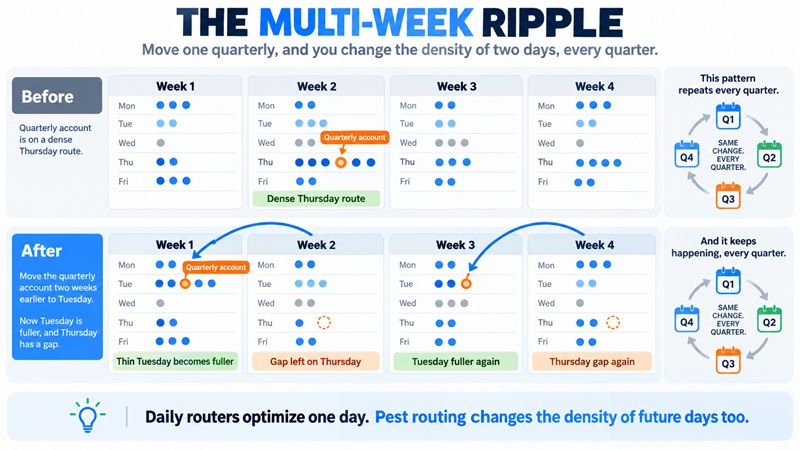
This is the real reason pest-native routing tends to beat a general or delivery router on a pest route. The pest-built platforms schedule recurring work as agreements on cycles and route with the cycle in view, so the density you build holds up across the calendar. A day-at-a-time optimizer gives you a clean Tuesday and lets the month drift. It is not that the general tools route badly. It is that they solve the wrong shape of problem, and the difference only shows up over weeks, which is exactly when it is expensive to discover.
If you carry mostly recurring residential work, weight this heavily. If you run mostly one-time or on-demand jobs, it matters far less, and a simpler tool will do.
Pest routing, general routing, or a standalone optimizer?
Three kinds of tool can route a pest business, and they are not interchangeable. The first question is which kind you need, before any brand.
| Pest-native platform | General field-service platform | Standalone route optimizer | |
|---|---|---|---|
| Examples | GorillaDesk, FieldRoutes, PestPac, Briostack, Pocomos, Fieldwork | Jobber, Housecall Pro, QuoteIQ, ServiceTitan | OptimoRoute, Route4Me, Circuit |
| Routes recurring cycles | Built for it | Workable | Usually per-day only |
| Knows your service agreements | Yes | Yes | No |
| Chemical records, WDO forms | Yes (native) | No | No |
| Bills the customer | Yes | Yes | No |
| Best when | Pest is your main line | You run a second service line too | Your main software's routing is weak |
The standalone optimizers deserve a clear-eyed look, because they are genuinely the best at the one thing they do and the worst fit for everything else. OptimoRoute, Route4Me and Circuit were built for delivery fleets, and their sequencing is excellent. They also cannot see a service agreement, a chemical application or an invoice, because none of that is their job. A pest operator using one is running it alongside a separate system that holds the customers and the billing, and re-keying between the two.
There is one situation where that trade makes sense: you are committed to a CRM or FSM whose routing is too weak to live with, and switching the whole system is not worth it this year. Then a standalone optimizer layered on top buys you better routes without a migration, at the cost of a second tool. Outside that case, a platform that routes and runs the rest of the business from one place is the simpler answer, and the full pest control software comparison covers those platforms across every job, not just routing.
What to actually ask a routing vendor
A demo is built to show the optimizer at its best on clean data. These seven questions surface how it behaves on your data instead, in the order worth asking them. The demo will not raise them for you.
- "Is route optimization included in the tier you are quoting me, or is it an add-on or a higher tier?" Routing is often gated above the entry price. Ask before the number anchors, so you are comparing the tier you would actually run on.
- "When I move a recurring account to a different week, does the system re-optimize the surrounding weeks, or just that day?" This is the multi-week test in one question. A day-only answer tells you the tool will let your month drift no matter how clean each day looks.
- "Is there a cap on stops per route or per day on my plan?" Some entry tiers limit stops. Find the ceiling before you hit it in peak season.
- "Does the routing account for service frequency, so a quarterly and a monthly account on the same street get grouped when their cycles line up?" This separates pest-aware routing from a generic day optimizer that treats every stop as a one-off.
- "Can I load my real customer list into a trial and route an actual week?" If the answer is a canned demo only, you cannot test it against the baseline from section two, which is the only test that decides anything.
- "What are the setup fee, the contract length, and the notice to cancel?" The monthly price is not the cost. Quote-only platforms in particular carry setup fees and annual terms that the sticker never mentions.
- "If I outgrow this tier, what does the next one cost, and does the pricing model change?" Per-user, per-schedule and per-customer pricing diverge fast as you add trucks or accounts. Know the curve, not just the entry point.
Write down who answered and when, because you will call back. A vague answer is itself information: the things a rep has to go and check are usually the things the marketing would rather not lead with.
Pro tip: If you run mostly recurring residential work, ask question two first. If the rep does not immediately understand why moving one quarterly account matters across weeks, the tool probably optimizes a day at a time, and you have your answer before the demo even starts.
How to tell a real drive-time claim from a marketing one
Every routing vendor quotes a drive-time saving, and almost none of them shows the math. "Cut drive time up to 40 percent," "improve route density 18 to 25 percent," "grow three times faster" are marketing figures, self-reported, with no disclosed method and no sample. They are not lies exactly. They are the best case, from the seller, presented as a typical result. Treat them the way you would treat a contractor who quotes only his best job.
The number that is true is the one you measured in section two. You already have your stops per day, your drive time per stop, and your windshield hours for a real week, so test the tool against those, not against its brochure. Load that same week into a trial, let the optimizer re-sequence it, and compare its route to what you actually drove. If it saves you fifteen minutes a day, that is real and worth paying for. If it saves you two, your problem was never sequencing, and the money belongs in territory and service-day design instead. Either answer is useful, and neither one comes from a vendor's percentage.
Pro tip: When a vendor quotes a drive-time saving, ask what it was measured against and across how many routes. The honest answer is usually a single favorable case study, not a fleet average, and a rep who cannot say has at least stopped quoting the number as if it were already yours.
How to trial a routing tool in a week
Most trials get spent admiring a clean demo map. A week is enough to answer the real questions if you use your own data.
- Load one real service area, twenty to forty actual accounts with their real addresses and service frequencies. Demo data is evenly spaced; your customers are not.
- Sequence a real day and compare the tool's order and drive time to how you would have run it yourself.
- Move a recurring account by two weeks and watch what happens to the days around it. This is the multi-week test, and it separates pest-aware tools from day-at-a-time ones.
- Run the optimizer against your densest and most scattered days and note how differently it helps each.
- Check the live map and GPS with a technician actually in the field, not from your desk, and confirm a stop marks complete cleanly.
Pro tip: Do this in your slow season, not your busy one. Testing routing software in peak, with the route at full load and swarm calls coming in, turns a good evaluation into a bad week.
Frequently Asked Questions
Q.1 What is the best pest control routing software for a small business?
For a pest-only operation of one to four trucks, GorillaDesk is the strongest starting point: rated 4.8 from 43 verified G2 reviews, it sequences routes up to 25 stops on its $49 tier and adds advanced routing at $99, with chemical records tied in. Fieldwork and Pocomos are the other pest-native options at published prices. If you run a second service line, Jobber routes both from one system from $29 a month.
Q.2 How much does pest control routing software cost?
Published starting prices for pest-capable platforms run from about $29.99 to $99 a month: QuoteIQ at $29.99, GorillaDesk at $49, Fieldwork and Housecall Pro at $59, Pocomos at $99. FieldRoutes, PestPac, Briostack and ServiceTitan quote per business. A standalone route optimizer like OptimoRoute runs about $35 to $44 per driver a month on top of whatever software you already use.
Q.3 Does Housecall Pro or Jobber have route optimization?
Both do. Jobber includes general route optimization and has for some time. Housecall Pro added route-based scheduling in a May 2026 release, so older comparisons calling it manual-only are out of date. Neither is tuned specifically to recurring pest cycles the way a pest-native platform is, and neither handles chemical records or WDO forms, so termite-heavy or compliance-driven operations usually prefer a pest-built tool.
Q.4 Should I use a standalone route optimizer or one built into my software?
Use the built-in routing unless your main software's routing is genuinely too weak to live with. A standalone optimizer like OptimoRoute or Route4Me sequences better than most built-in tools, but it cannot see your service agreements, chemical records or invoices, so you run it as a second system alongside the one that holds your customers. That trade is worth it only when switching your whole platform is not, usually because you are locked into a CRM you otherwise like.
Q.5 Will routing software actually reduce my drive time?
It depends on whether your problem is the order of your stops or the spread of them. If your accounts cluster into a few neighborhoods, sequencing them well saves real time. If they are scattered across a wide area, the best possible order is still a long route, and the fix is tighter territory and service-day grouping, not software. Measure your stops per day and drive time per stop first, then test any tool against that baseline rather than its marketing claim.
Q.6 What is the difference between routing, scheduling and dispatch software?
Routing sequences a day's stops to cut drive time. Scheduling manages the calendar: which customer is served on which day, and by whom. Dispatch is the real-time, day-of coordination: sending the right technician to the next job and tracking them by GPS. Most pest control platforms do all three, which is why the terms blur, but they are distinct jobs, and a tool can be strong at one and ordinary at another.
Conclusion
Routing software sequences a dense book brilliantly and cannot rescue a thin one. If your accounts cluster and your service days are grouped, a good optimizer is a real upgrade and worth paying for. If your route is bleeding money on drive time, the tool is not the first purchase; a tighter service area and neighborhood-grouped service days are, and they cost nothing but decisions. The map comes first, the software second. Pest control marketing covers how to grow the book without scattering it, which is the density problem solved at the source.