You are comparing monthly prices. Put them down for a second.
A one-truck route billing $150,000 a year, paid mostly by card, hands about $4,000 to $5,000 a year to payment processing. The difference between the cheapest invoicing subscription and one three times the price is a few hundred dollars a year. So the number you are studying, the monthly sticker, is the small one, and the number you are not studying is the one moving real money out of the business.
That is the whole problem with how pest control invoice software gets chosen. The comparison everyone runs is the comparison that matters least. This guide runs the other one, with pricing pulled from each vendor's own page in September 2026, and it does it from a company that sells none of these tools. If you bill only a few accounts, skip ahead: section four is written for you.
The short version
Billing a handful of accounts, or not launched yet? Square or Wave invoices for free and you pay only when a customer pays. QuickBooks if you also want the books in one place.
One to four trucks, pest only? GorillaDesk ties invoicing to chemical records and publishes its pricing from $49 a month. QuoteIQ bundles recurring invoicing, autopay and reminders from $29.99. Fieldwork keeps office staff off the seat count.
Running pest control alongside another line? Jobber invoices cleanly from one system and carries the deepest review history in the category.
Past a few trucks with real termite or commercial work? PestPac, FieldRoutes and Briostack are the established pest-native options and are worth the quote request.
What's in this guide
- What invoicing has to do in a pest control business
- The number nobody compares: your payment processing rate
- Two questions that decide everything
- If you just need to send an invoice and take a card
- Pest-capable platforms that invoice well
- QuickBooks and the accounting seam
- How to trial an invoicing tool in a week
What invoicing has to do in a pest control business
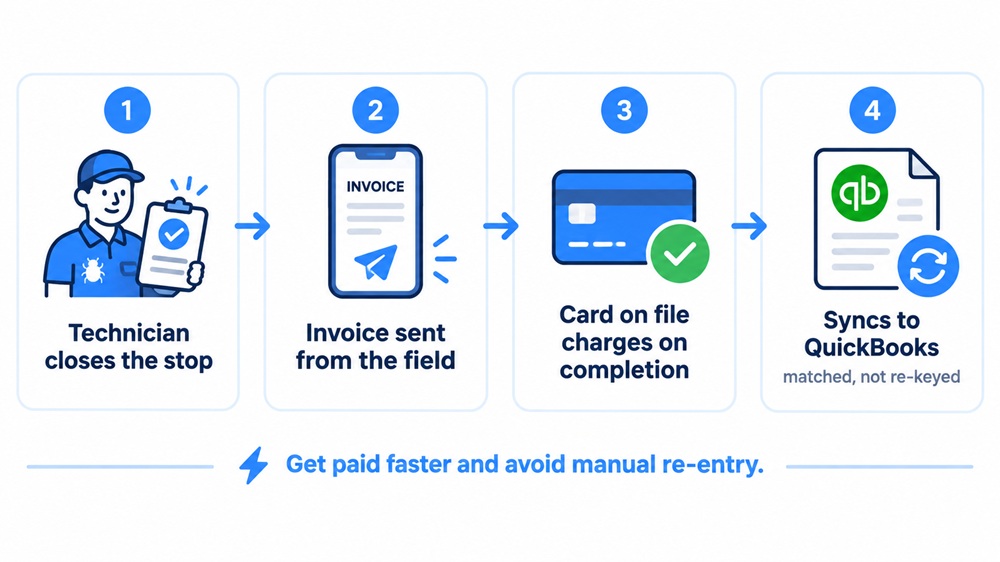
Invoicing software has one job, getting paid for work already done, and in pest control that job has four parts. Everything on a feature list is one of these four or a convenience on top of them.
- Create and send the invoice from the field. The technician closes the stop, the invoice goes out. Every hour between the service and the invoice is an hour the money sits in someone else's account.
- Bill recurring agreements on their own schedule. Quarterly, bi-monthly, monthly and annual plans should invoice themselves. This is the part general tools get wrong and the part that separates pest-capable software from a plain invoice generator.
- Take a card on file at the time of service. A stored card that charges on completion is the difference between money in the account Friday and a receivable you chase in three weeks.
- Sync to your accounting. Whatever you invoice has to land in QuickBooks or its equivalent without someone re-keying it, or the software has added a job instead of removing one.
Recurring revenue is most of a pest control business, so recurring billing is most of the software's value. Industry cost data puts recurring work at roughly three quarters of income. A tool that bills those agreements cleanly is doing the thing you bought it for. A tool that makes you nudge each one every month is a calendar with an invoice button.
The rest of the article is about picking one, and the first decision is not a brand. It is a number.
Pro tip: Before you compare anything, write down your annual card volume, roughly what you collect by card in a year. Every real cost comparison below is built on that one figure, and most operators have never put it on paper.
The number nobody compares: your payment processing rate
Your card processing rate is the largest software-related cost you will pay, and it is set separately from the subscription. Two tools at the same monthly price can be $1,000 a year apart once cards run through them, and the roundups comparing invoicing software almost never mention it.
Here is what the tools actually charge, from their own pages in September 2026.
| Tool | Card rate | ACH / bank | Notes |
|---|---|---|---|
| Housecall Pro | As low as 2.59% | 1% | Volume-based; Amex 3.49% |
| Jobber | About 2.9% + $0.30 | 1% | Flat regardless of volume |
| QuoteIQ | Stripe standard (about 2.9% + $0.30) | Varies | Payments run through Stripe |
| Square (free invoicing) | 3.3% + $0.30 online | 1% | 2.6% + $0.15 in person |
| Wave (free invoicing) | 2.9% + $0.60 | 1% | Amex 3.4% + $0.60 |
Now put those rates on a real route. Take $150,000 a year collected by card across roughly a thousand invoices.
| Rate | Annual processing cost |
|---|---|
| 2.59% | about $3,885 |
| 2.9% + $0.30 | about $4,650 |
| 3.3% + $0.30 | about $5,250 |
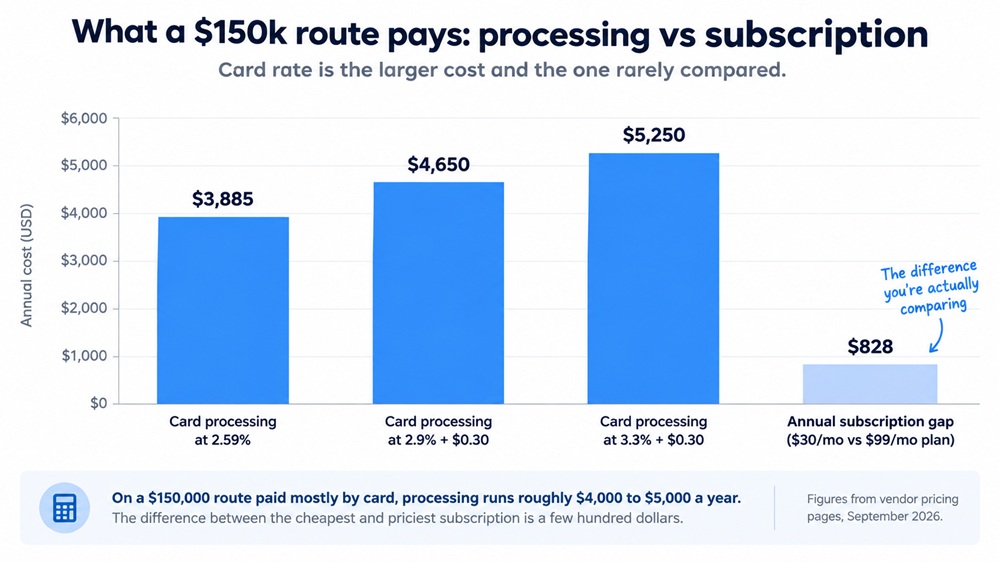
The spread from the lowest to the highest of these is roughly $1,350 a year on a single truck, and it grows with every dollar you collect. For comparison, moving from a $30 subscription to a $99 one costs about $828 a year. The processing rate is the bigger lever, and it is the one that gets no attention.
Three things follow from this.
- A slightly higher subscription with a lower card rate can be the cheaper tool. Housecall Pro's published tiers are not the lowest here, but its card rate is, and on a route with real card volume that rate wins the total back.
- The free invoicing tools are not free. Square and Wave charge nothing monthly and a higher rate per card. That trade favors you at low volume and turns against you as the route grows.
- ACH is the cheapest money you can collect. At 1%, bank payments cost a fraction of card. On recurring residential agreements, where the customer is not standing at the door with a card, pushing autopay onto ACH is worth more than any subscription discount.
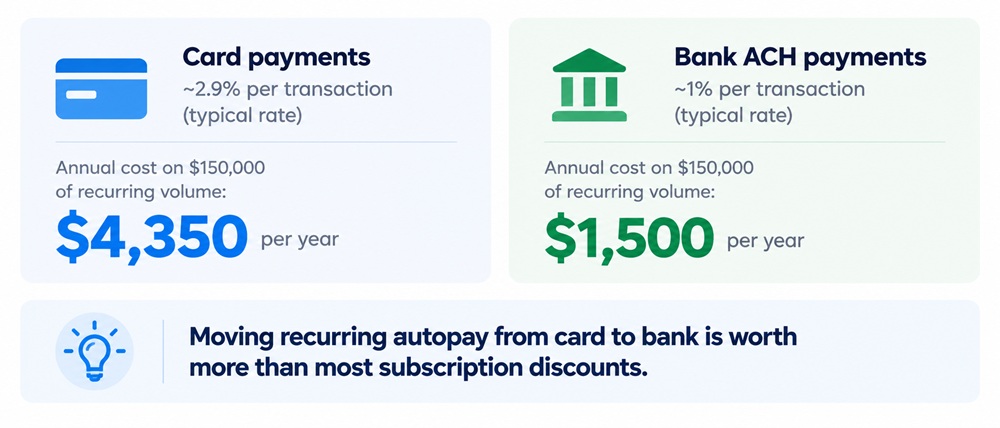
Pro tip: Ask every vendor for the card rate and the ACH rate in the same email you ask for the subscription price. If a rep can quote the monthly fee instantly but has to check on processing, that tells you which number they would rather you not weigh.
Two questions that decide everything
Before any brand name, two questions sort the whole field.
First, do you need pest-specific software at all? If you bill a handful of accounts and mostly take one-time or simple recurring work, a general invoicing tool will send a clean invoice and take a card for far less. If you run dozens of recurring agreements, carry termite or WDO work, or need chemical records tied to the invoice, a pest-capable platform earns its price.
Second, pest-native or general? Among the pest-capable tools, some are built for the trade and some serve every home service.
| Pest-native | General field service | |
|---|---|---|
| Examples | GorillaDesk, PestPac, FieldRoutes, Briostack, Pocomos, Fieldwork | Jobber, Housecall Pro, QuoteIQ |
| Recurring agreement billing | Built as agreements | Usually workable, sometimes as repeating jobs |
| Chemical records on the invoice | Native | A custom field you maintain |
| WDO / termite forms | Generated | Not generated |
| Runs a second service line | Pest focused | One system for pest plus lawn or other |
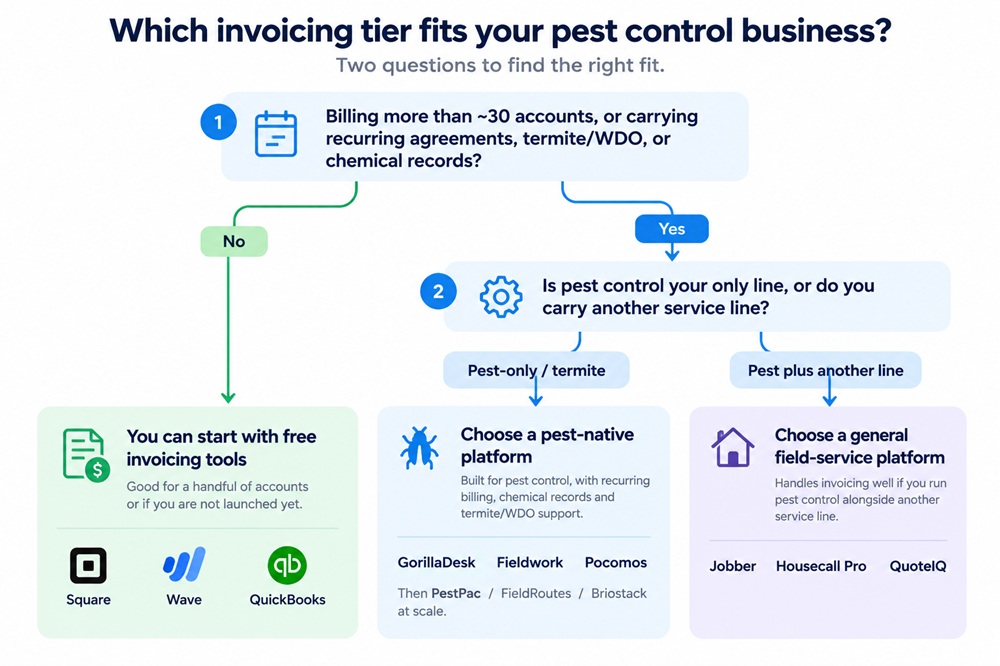
The deciding question is usually whether you produce WDO reports and whether pest is your only line. Termite-heavy and pest-only operations fit the pest-native tools. An operator running pest control alongside lawn care often runs both from one general platform instead of paying for two. This is the same fork the full pest control software comparison covers in depth for the whole operations suite; here it only decides who invoices you.
If you just need to send an invoice and take a card
If you bill a few dozen accounts and mostly do one-time or simple recurring work, you do not need pest software yet. You need to send a professional invoice and collect a card, and three tools do exactly that for little or nothing a month.
- Square invoices for free. No monthly fee, unlimited invoices, recurring invoices and estimates on the free plan, and you pay only when a customer pays: 3.3% plus $0.30 on an online invoice, or 1% on a bank transfer. It suits an operator who wants zero commitment and takes a lot of cards on site.
- Wave also invoices for free, with a card rate of 2.9% plus $0.60 and 1% on bank payments, and a paid tier at $19 a month if you want the first ten transactions each month fee-free and fuller accounting. It suits someone who wants the invoicing and the books in one free place.
- QuickBooks is the accounting anchor rather than a field tool. Its free tier sends invoices and tracks income and expenses; paid bookkeeping starts at $38 a month. If your accountant already lives in QuickBooks, invoicing straight from it keeps one fewer system in your life.
Here is the line where you outgrow all three. These tools invoice one customer at a time and expect you to remember the schedule. The day you are hand-billing twenty quarterly agreements, chasing cards that should charge themselves, or wanting the chemical record on the invoice for a state file, the manual work has passed the price of pest-capable software. That is not a failure of the free tools. It is the point they were never built to reach, and reaching it is a sign the business grew.
If you are earlier than this entirely, how to start a pest control business covers what to have in place before invoicing is your problem.
Pro tip: Send your own test invoice through whichever free tool you are considering, then pay it from a second device. The two minutes tells you what your customer sees and how fast the money lands, which is most of what matters at this size.
Pest-capable platforms that invoice well
Past the free tools, these are the platforms that invoice a real pest control route. Pricing is from each vendor's own page in September 2026. Ratings are from G2, which publishes verified review counts with sample sizes, and a rating attached to 43 reviews and one attached to 10 are different claims, so the count is in the table.
| Platform | Type | Starting price | Pricing model | Published card rate | G2 (reviews) |
|---|---|---|---|---|---|
| GorillaDesk | Pest-native | $49/mo | Per schedule | Via Stripe | 4.8 (43) |
| Fieldwork | Pest-native | $59/mo | Per field tech, office free | Not published | Not listed |
| QuoteIQ | General | $29.99/mo | Per tier, users included | Stripe standard | Not listed |
| Jobber | General | $29/mo (annual) | Per user | ~2.9% + $0.30 | 4.6 (518) |
| Housecall Pro | General | $59/mo (annual) | Per user | As low as 2.59% | Not listed |
| Pocomos | Pest-native | $99/mo | Per active customer | Not published | 4.8 (10) |
| PestPac | Pest-native | Quote only | Per business | Not published | 4.1 (132) |
| FieldRoutes | Pest-native | Quote only | Per active customer | Not published | 4.4 (266) |
| Briostack | Pest-native | Quote only | Per business | Not published | Not listed |
GorillaDesk
Best for: solo operators through about four trucks who want the chemical record tied to the invoice and the price before a sales call.
Pest-native, and the highest-rated pest-focused platform on G2 with a real sample at 4.8 from 43 reviews. Published pricing at $49, $99 and $149 a month. Subscription (recurring) billing arrives at the $99 Pro tier, along with a customer portal, e-signatures and the QuickBooks integration. Seats count by schedule rather than by head, so office staff cost nothing. For a pest-only operation that lives on recurring agreements, invoicing and chemical tracking sit in one workflow.
Fieldwork
Best for: a small pest-native shop with a couple of technicians and office help, that wants pest-specific billing at a published price.
Published tiers at $59, $79 and $99 a month, with the $79 tier positioned as the standard. Office staff are free and do not occupy a seat, so only dispatched technicians count. Fieldwork does not appear in G2's pest control category, so there is no third-party rating to weigh against the price, which makes the free 14-day trial the evidence that matters most here.
QuoteIQ
Best for: a solo or small operator who wants recurring invoicing, autopay and automated reminders bundled in at a published flat rate, without pest-native chemical or WDO features.
Five flat tiers from $29.99 to $699 a month, with users included in each tier rather than billed per seat, and a 14-day trial. Recurring invoices, online payments and autopay are on every plan from Essentials; the QuickBooks Online integration and the email and text automation that chases overdue invoices arrive at Pro ($149.99). Payments run through Stripe at standard rates. It is general rather than pest-native, so termite forms and chemical-to-invoice records are not part of it. For an operator whose need is billing and follow-up rather than compliance, the bundling is the appeal.
Jobber
Best for: an operator running pest control alongside another service line, and buyers who weigh a long track record heavily.
The deepest review history in G2's pest control category, 4.6 from 518 reviews, more than ten times the next pest-focused sample. Published tiers from $29 a month on annual billing, a 14-day trial with no card, clean invoicing, and a two-way QuickBooks sync. A business running pest control and lawn care invoices both from one system. Additional users are $29 a month each, and there is no WDO form generation, so termite-heavy operations usually land on a pest-native tool. For a mixed-line shop, running one system instead of two is the case for it.
Housecall Pro
Best for: a small operation that wants simple published tiers and the lowest published card rate in this set.
Published pricing at $59, $149 and $299 a month on annual billing, a 14-day trial with no card, and card processing as low as 2.59% with ACH at 1%. On a route with real card volume, that rate is the reason to look here, because it earns back more than the subscription difference. It is general rather than pest-native, so pest-specific records are custom fields. Users beyond a tier's allowance run $75 to $100 a month, so it rewards staying inside a tier.
Pocomos
Best for: a small, growing pest-only operation that would rather pay by book size than by headcount.
Pest-native, rated 4.8 on G2 from 10 reviews, so read that figure as directional rather than settled. Published tiers at $99 a month for up to 20 active customers, then $159, $209 and $275 as the book grows, with technician count left out of the bill. That model suits a business hiring faster than its customer list is growing. The entry tier's 20-customer ceiling is low enough that most operating businesses start at $159.
PestPac, FieldRoutes and Briostack
Best for: established multi-truck operations, particularly termite-heavy ones and those with commercial accounts.
These are the established pest-native platforms, and they invoice at a depth newer tools have not had time to match: chemical usage tied to line items, multi-property invoice consolidation, complex recurring structures, and compliance reporting. PestPac is rated 4.1 from 132 reviews and FieldRoutes 4.4 from 266; Briostack is not listed in G2's pest control category. All three quote per business rather than publishing a price, and FieldRoutes states it offers no free trial because each setup is tailored, so evaluating them means a sales process rather than a self-serve trial. For a large operation with real termite and commercial volume, that depth is the point. For a one-truck route, it is more product than the job needs, which is a reason to start smaller and grow into one of these, not a mark against them.
QuickBooks and the accounting seam
Whatever you invoice has to reach your accounting without being re-keyed, and "syncs with QuickBooks" hides two very different things. Ask which one a tool does before you sign.
- A two-way sync pushes customers, invoices and payments between the platform and QuickBooks Online and keeps them matched. Jobber and several pest-native tools work this way. This is what you want if your bookkeeper lives in QuickBooks.
- An export runs a general ledger file on a schedule that you then import, which PestPac uses. It works, but it is a step someone performs, not an automatic match, and partial payments are where it gets fiddly.
Two details decide whether the seam saves you time or adds a job. Confirm the sync is two-way if you need it to be, and confirm how it handles a partial payment, because a customer who pays half of a $300 invoice is the case that exposes a weak integration. If your accountant runs QuickBooks Desktop rather than Online, verify support specifically, since several tools connect only to Online.
How to trial an invoicing tool in a week
Most trials get spent clicking an empty demo. A week is enough to answer the real questions if you run one sequence with your own data.
- Enter twenty real accounts with their actual addresses, service frequencies and prices. Demo data is clean and your data is not, and the messy accounts are the ones that break software.
- Build a quarterly recurring agreement and confirm it bills itself without a monthly nudge.
- Skip a service and reschedule it mid-cycle, then watch the billing date. This single test separates the tools more than any feature list.
- Take a payment with a card on file, then issue a partial refund. Partial refunds are where payment handling is thin.
- Send one invoice by text and one by email and pay both from a second device, to see what the customer sees and how fast money lands.
- Push one invoice through to QuickBooks and check it landed matched, not duplicated.
Pro tip: Run the same six steps on both finalists in the same week with the same twenty accounts. Comparing a fresh trial against a six-month memory of the other tool is not a comparison.
Frequently Asked Questions
Q.1 What is the best invoicing software for a small pest control business?
For a pest-only operation of one to four trucks, GorillaDesk and Fieldwork are the strongest starting points. GorillaDesk is rated 4.8 from 43 verified G2 reviews and publishes pricing from $49 a month, tying chemical records to the invoice. Fieldwork starts at $59 and keeps office staff off the seat count. If you run a second service line, Jobber invoices both from one system from $29 a month.
Q.2 How much does pest control invoice software cost?
Published starting prices run from about $29.99 to $99 a month: QuoteIQ at $29.99, GorillaDesk at $49, Fieldwork and Housecall Pro at $59, Pocomos at $99. PestPac, FieldRoutes and Briostack quote per business. The larger cost for most operators is card processing, which runs roughly 2.59% to 3.3% and reaches four to five figures a year on a working route, so weigh the rate alongside the subscription.
Q.3 Is there free invoicing software for pest control?
Yes. Square and Wave both send unlimited invoices with no monthly fee, and you pay only when a customer pays, roughly 2.9% to 3.3% on a card and 1% on a bank transfer. QuickBooks has a free invoicing tier as well. These work well until you are hand-billing many recurring agreements or need chemical records on the invoice, at which point pest-capable software saves more than it costs.
Q.4 Does pest control invoicing software work with QuickBooks?
Most do, but in two different ways. A two-way sync keeps customers, invoices and payments matched between the tool and QuickBooks Online automatically, which Jobber and several pest-native platforms offer. An export sync produces a file you import on a schedule, which PestPac uses. Confirm which one you are getting, whether it handles partial payments, and whether it supports QuickBooks Desktop if that is what you run.
Q.5 Can I invoice from the field on my phone?
Yes. Every platform here except the oldest desktop tools includes a mobile app that lets a technician close a stop and send the invoice before leaving the driveway. The value is in the timing: invoicing at the property, with a card already on file, collects the money days sooner than invoicing from the office that evening or the next morning.
Q.6 What is the difference between invoicing software and full pest control software?
Invoicing software gets you paid: it creates and sends invoices, takes payments, and handles recurring billing. Full pest control software does that and adds routing, scheduling, chemical tracking and WDO forms. Many tools here do both, which is why the categories blur. If getting paid is your only gap, an invoicing-focused tool is enough; if the route itself is disorganized, look at the full pest control software comparison.
Conclusion
Invoicing software collects money faster. It does not create money. The most common disappointment in this category is an operator who buys a billing tool expecting more revenue and finds a tidier version of the same route. If invoices are already going out and getting paid, better software is a real upgrade. If the phone is not ringing, the money belongs upstream of any of this. You can see where you stand against other companies in your service area with our Benchmark tool, and pest control marketing covers the rest.